
Construction rental cost tracking
Track Construction Rental Costs Across Every Job
Rental Leak tracks equipment rental costs as they build: what each rental has cost so far, what it charges at the next billing cycle, and what every job and vendor adds up to. Rental costs rarely blow up in one line item. They leak — one more week on a lift, one more cycle on a container — because the next charge arrives before anyone decides.
30-day free trial • No credit card required • Web, iOS and Android
Where the money goes
How rental costs grow without anyone deciding
Most rental overspend isn’t a bad rate. It’s time — a rental that stays on rent after the work is done because nobody made the call before the next billing period started.
- The work is finished, but the machine sits on site waiting for pickup that was never requested.
- A weekly or 28-day cycle rolls over a day or two after the rental stopped being useful — and you pay the whole period.
- Temporary services set up at mobilization keep billing long after everyone stops thinking about them.
- The off-rent call is made, but nobody follows up to confirm the vendor actually took it off rent.
- The invoice arrives weeks later, when the cost has already been incurred.
If some of this is already happening, start with a sweep: how to find forgotten rental equipment across your jobsites.
What you see
Rental costs as they stand today — and what’s next
At risk today
Rentals whose next charge lands today or tomorrow — the ones where a decision still changes the bill.
Within 7 days
Every rollover coming up this week, with the amount that will be charged if nothing changes.
Next 30 days if nothing changes
Every charge each rental would post over the next 30 days, including repeated daily, weekly, 28-day and monthly cycles — a projection from confirmed terms, not an invoice. Each rental still shows its own next rollover date and amount.
Exposure by project and vendor Pro
Spend and rollover reports group current exposure by project, vendor and location, with off-rent history.
Confirmed, not guessed
Dollar figures only appear for rentals with confirmed terms. Anything unconfirmed is shown as needing review instead of an estimate.
Invoice check Contractor & Pro
Rental invoice reconciliation compares a vendor invoice against your confirmed terms and flags a possible extra billing period before you pay.
On the dashboard
Today, this week and the next 30 days
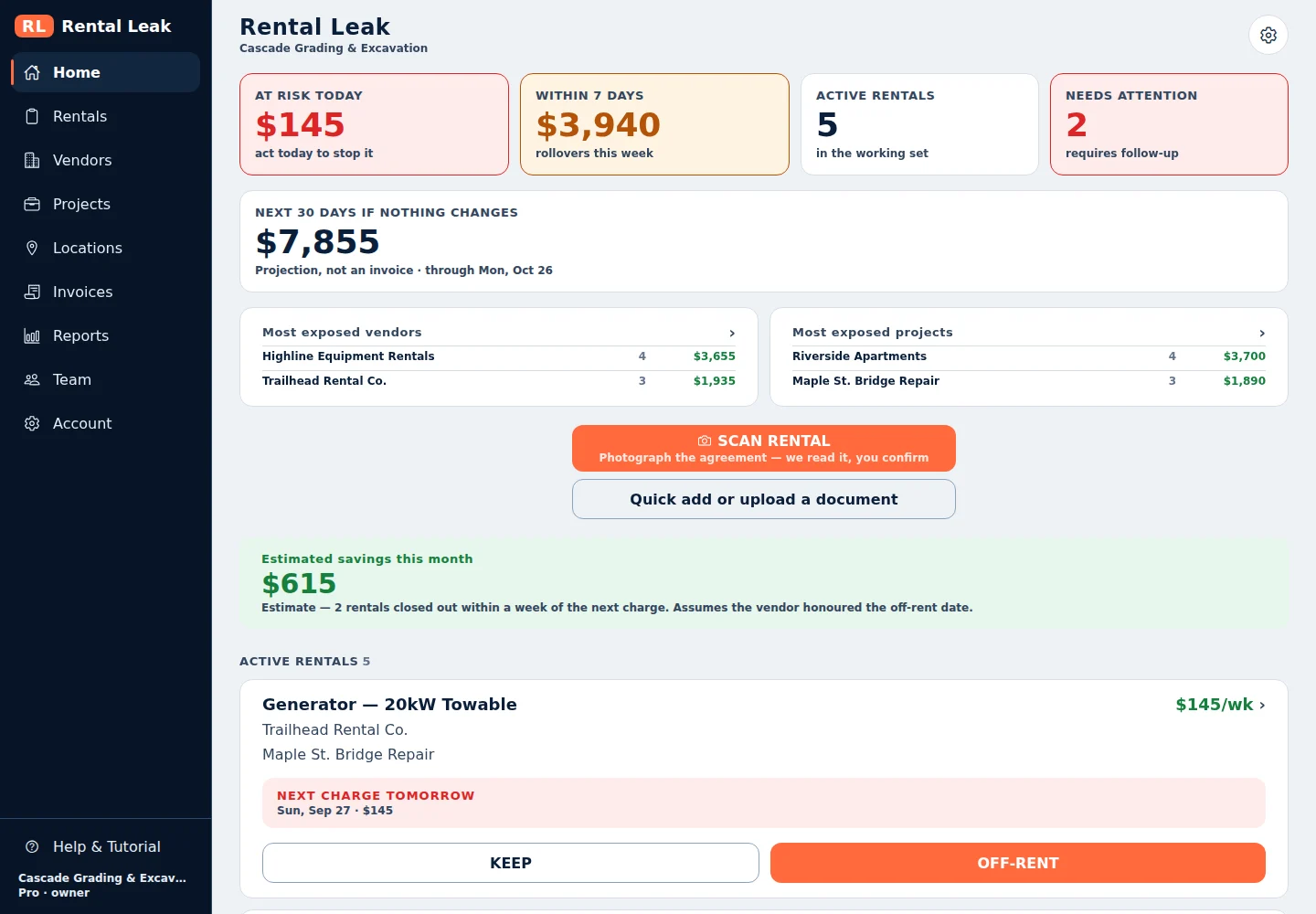
The Rental Leak web app, shown with sample company data.
Rental cost reporting
Current rental cost and rental cost reports
Active rental costs are only useful if they can be seen per rental, per job and per vendor — and handed to whoever does job costing.
Estimated cost to date
Every rental with confirmed terms shows what it has cost so far: the billing periods charged to date at the confirmed rate. It is the base rental charge, labelled as an estimate — not an invoiced amount.
Rental Summary
On the Contractor and Pro plans, export your rentals to PDF, CSV or Excel with vendor, project, PO, rate, billing period, estimated cost to date and the current next rollover.
Full Exposure & Savings Pro
A PDF or Excel report of current exposure and upcoming rollovers grouped by project, vendor and location, with estimated savings on returned rentals.
Vendor spend Pro
Current rental exposure, active rental count, upcoming rollovers and confirmed spend for each rental vendor.
Accounting & Job Cost Contractor & Pro
One row per vendor invoice — vendor, job, PO, dates, confirmed rate, invoice number and any discrepancy — as CSV or Excel for job costing.
Your reporting period
Reports cover all time by default, or the period you choose. Older rentals are not dropped from reports because of their age.
Reports sum confirmed rentals only; a rental whose terms still need review is counted separately, never estimated. When a vendor invoice arrives, reconcile the rental invoice against the same confirmed terms, and see how to track rental costs in QuickBooks for where the accounting entry fits. If a charge shows up for a rental that already went back, here is what to check when you are charged after a return.
Why the billing cycle matters
The decision has to come before the rollover
A rental is billed in periods. On a weekly rental, returning it one day after the week rolls over usually means paying for the whole next week. On a 28-day cycle, the next period can start on a different date than the calendar month you’re used to. The cost of a late decision is a full period, not a day. (How 28-day and monthly billing differ.)
That’s why Rental Leak is organized around the next charge. It calculates each rental’s next rollover from the start date and billing cycle, surfaces the ones about to roll, and asks for a decision: KEEP it, request off-rent, or mark it returned. The iOS and Android apps send reminders ahead of each rollover.
Want a rough sense of what late returns might be costing you? The rental rollover cost calculator gives a quick estimate from three numbers you already know.
Illustrative examples
What a late decision can cost
A day late rarely costs a day. Under most agreements it costs the next billing period.
Weekly boom lift, $450 a week
Picked up the day after the week rolled over. On a typical weekly agreement that one day can cost the whole next week — up to another $450.
28-day trailer, $1,200 a cycle
The off-rent call goes in two days after the cycle turned. A full new 28-day period may already have started.
Daily generator, $100 a day
Finished on Monday, requested but not picked up until Thursday: three more days, $300, for nothing.
Illustrative figures, not customer data. Actual charges depend on your agreements and each vendor’s billing and return policies.
Honest numbers
What Rental Leak does — and doesn’t — claim
Rental Leak doesn’t promise a savings number. What you save depends on your rates, your vendors’ billing terms and how quickly rentals actually come off rent. When a rental is returned, Rental Leak shows an estimated savings figure based on the confirmed rate, and labels it as an estimate that assumes the vendor honored the off-rent date.
Its job is simpler: make sure the people deciding can see the cost and the date in time to decide.
Pricing
A cost-control tool with a predictable cost of its own
Rental Leak’s price depends on how many people use it, not on how much you rent. Track every rental, vendor and project — from one job or many vendors — without the software bill growing with your rental count.
Starter — $59/month
Up to 3 users. Scanning, rollover tracking and reminders, vendors, projects and the dashboard.
Contractor — $99/month
Up to 10 users. Adds team verification, rental PDF, CSV and Excel export, invoice reconciliation, QuickBooks Online integration and accounting export.
Pro — $149/month
Up to 25 users. Adds spend and rollover reports, vendor spend analytics and location reporting.
- No per-rental fees — the number of rentals you track doesn’t change the price.
- No per-asset, per-vendor or per-project fees.
- No GPS or telematics hardware to buy or install.
- Published prices, so you know what it costs before you sign up.
Common questions
Does Rental Leak guarantee savings?
No. Rental Leak shows what you’re paying and when the next charges land so decisions can happen before a rollover. Any savings depend on your rates, billing terms and how quickly rentals come off rent.
How is rental exposure calculated?
From each rental’s confirmed rate, billing cycle and start date. Rentals without confirmed terms are counted separately as needing review rather than guessed.
Can I export rental costs for job costing?
Yes. The Contractor and Pro plans export rentals to PDF, CSV and Excel, include an accounting and job-cost export with vendor, job, PO, dates, confirmed rate and invoice number, and can send reviewed rental invoices to QuickBooks Online as Bills.
Does the price go up as we track more rentals?
No. Plans are priced by the number of users — Starter $59/month for up to 3, Contractor $99/month for up to 10, Pro $149/month for up to 25. The number of rentals, vendors or projects doesn’t change the price.
What does the 30-day projection include?
Every charge each rental with confirmed terms would post over the next 30 days if nothing changes, including repeated billing cycles. Returned and voided rentals are left out, and rentals whose terms still need review are listed as not included rather than estimated.
How do I see current rental costs across jobs?
Each rental shows its estimated cost to date and its next charge, and rentals are grouped by project and by vendor. On the Pro plan, spend and rollover reports total current exposure by project, vendor and location.
Why do contractors lose money on forgotten rentals?
Because rentals bill in whole periods. Equipment that sits on site after the work is done, or a service nobody called off, rolls into another billing cycle and is usually charged for all of it. The cost comes from a late decision, not a bad rate.
Keep reading
Related
Equipment rental tracking software
The rental record behind every machine: vendor, job, rate, cycle and agreement.
Track rented equipment →Rental billing cycle tracking
Daily, weekly, 28-day and monthly rollover dates, with reminders before each one.
Track billing cycles →Rental invoice reconciliation
Compare each vendor invoice with the rate, cycle and return date on record.
Reconcile rental invoices →Temporary jobsite services tracking
Dumpsters, toilets, containers and fencing that keep billing every cycle.
Track temporary services →Track rental costs in QuickBooks
How rental costs fit into QuickBooks, and what has to be tracked before the invoice.
Read the guide →Plans and pricing
Starter, Contractor and Pro, priced by team size with a 30-day free trial.
Compare plans →See your rental exposure before the next cycle
30 days free, no credit card required. New trials include Pro features for the full 30 days. After that, plans start at $59/month — priced by team size, with no per-rental or per-asset fees.