
Rental agreement tracking
Scan, Store and Track Rental Agreements
Rental agreements usually end up in a truck, a folder of PDFs or an email thread. Rental Leak turns each one into a tracked rental: take a photo or upload the PDF, review what it read, and the agreement stays attached to the rental it belongs to.
30-day free trial • No credit card required • Web, iOS and Android
Getting the agreement in
Photo or PDF, from the field or the office
Photograph it
Take a photo of the agreement with your phone — one page or several pages (up to five) for a longer agreement.
Upload the PDF
Upload a PDF agreement the vendor emailed you (up to 10 MB and 10 pages).
From anywhere
Scan in the iOS or Android app on site, or upload on the web app in the office.
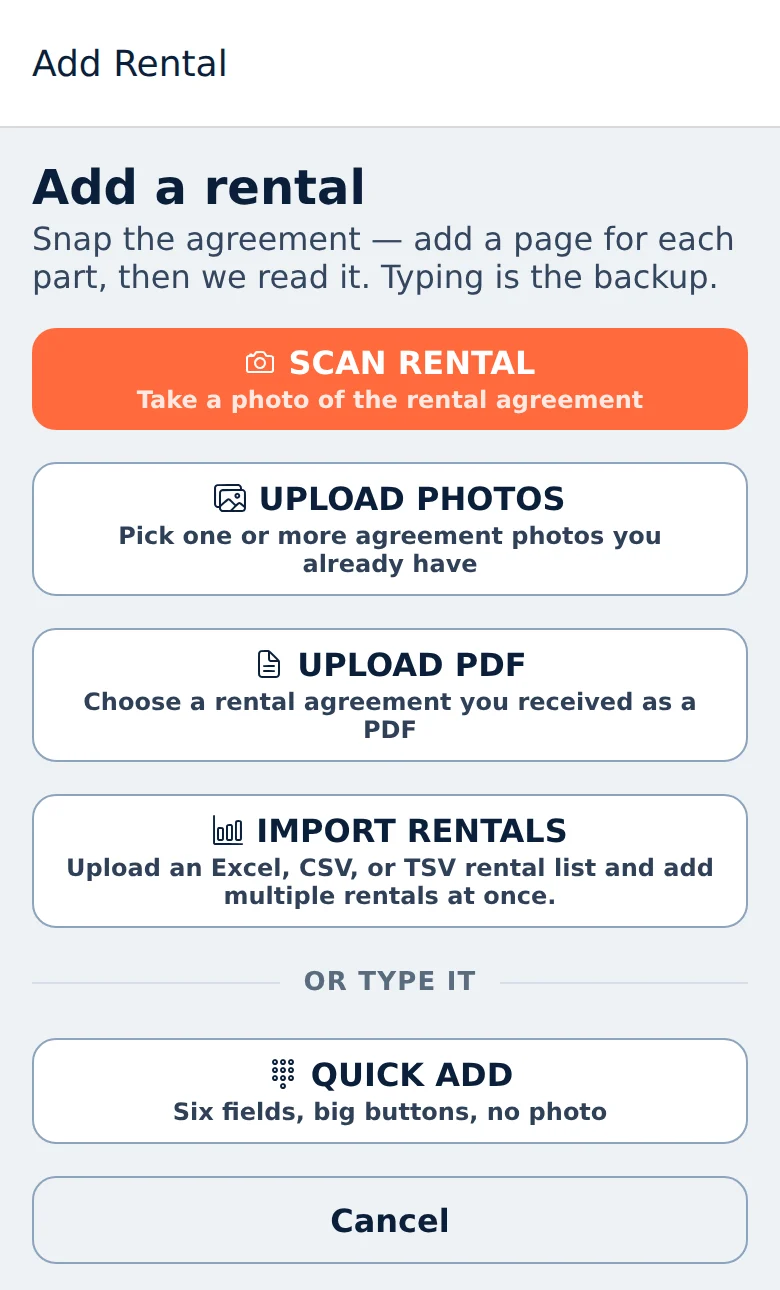
Adding a rental in the phone app, shown with sample data.
What it reads
Rental Leak suggests the details. You confirm them.
Rental Leak reads the agreement and suggests what it found. Nothing becomes part of your rental records until you review it and press Add.
- Vendor
- Equipment or service description
- Unit or asset number
- Job or project
- PO number
- Start date
- Rates — daily, weekly, 28-day and monthly, where stated
- Billing period, only when the agreement states it
Rental Leak never invents a value it didn’t read. If the billing period isn’t stated or a rate isn’t clear, it’s left for you to fill in and flagged, and the rental doesn’t show a dollar figure until the terms are confirmed.
Before you sign
Rental agreement terms worth checking
Most surprises on a rental invoice trace back to a term nobody read. These are worth a look on every agreement.
- The billing period. Daily, weekly, 28-day or monthly — a 28-day cycle rolls earlier than a calendar month.
- The rate for each period. Many agreements list daily, weekly and four-week rates side by side.
- The start date. Delivery day, or the day the paperwork was signed? It sets every rollover after it.
- Minimum rental and call-off terms. How much notice the vendor needs, and how they want to be told.
- Delivery, pickup, fuel and damage-waiver charges. Easy to miss, and billed on top of the rate.
Rental Leak records the facts that drive the next charge — rates, billing period, start date, vendor, job, unit and PO — and keeps the full agreement attached for everything else. When the rental comes back, the pickup date you record stays with it too.
Keeping records clean
Matching and duplicate warnings
Vendor and project matching
When the vendor or job on the agreement matches one you already have, Rental Leak pre-selects it. Something only similar is shown as a suggestion you accept or change — never used automatically.
Duplicate warning
If the agreement looks like a rental you already have — same equipment, vendor and project, plus the same unit, PO or start date — Rental Leak warns you before adding it. You can still add it if it’s genuinely a second rental.
The agreement stays attached
The photo or PDF is kept on the rental, so the terms are one tap away when a question or an invoice comes up.
After it’s tracked
What the agreement is used for
Once confirmed, the rate and billing period drive the rental’s next charge date and amount, and the rollover reminders on iOS and Android. On the Contractor and Pro plans, the confirmed terms are what a vendor’s invoice is compared against in rental invoice reconciliation.
The agreement is also your reference when the invoice arrives. If a vendor bills past the pickup date you recorded, invoice reconciliation on the Contractor and Pro plans flags it for review — one way the agreement supports rental cost control.
Adding agreements by email forwarding isn’t available today — agreements are added by photo, PDF upload, Quick Add or spreadsheet import.
Common questions
What happens if Rental Leak reads something wrong?
You correct it before adding the rental. Every extracted detail is a suggestion you review, and nothing is saved until you press Add.
Is the original agreement kept?
Yes. The photo or PDF stays attached to the rental and can be opened from the rental at any time.
Can I forward agreements by email?
Not today. Agreements are added by taking a photo, uploading a PDF, Quick Add, or importing a spreadsheet on the web app.
Which agreement details does Rental Leak read?
The vendor, equipment or service, unit or asset number, job, PO number, start date, stated rates, and the billing period when the agreement states it. Anything it can’t read clearly is left for you to fill in.
Can field crews scan agreements on site?
Yes. Scan with the iOS or Android app on site, or upload the PDF on the web app in the office. Either way the rental is reviewed before it’s added.
How should contractors keep track of rental agreements?
Keep each agreement with the rental it belongs to, and record the terms that drive cost — the rate, the billing period and the start date — where the people making decisions can see them. In Rental Leak the photo or PDF stays attached to the rental and the confirmed terms drive its next charge.
Keep reading
Related
Multi-vendor rental tracking
Rentals from every rental company on one list, without a portal for each.
Track every vendor →Equipment rental tracking software
The rental record behind every machine: vendor, job, rate, cycle and agreement.
Track rented equipment →Rental tracking spreadsheet alternative
What a spreadsheet handles, where it stops, and how to import the one you have.
Compare with a spreadsheet →Rental billing cycle tracking
Daily, weekly, 28-day and monthly rollover dates, with reminders before each one.
Track billing cycles →Rental invoice reconciliation
Compare each vendor invoice with the rate, cycle and return date on record.
Reconcile rental invoices →Construction rental management software
Everything Rental Leak does for contractors, from the agreement to the invoice.
See the overview →Turn your next agreement into a tracked rental
30 days free, no credit card required. New trials include Pro features for the full 30 days. After that, plans start at $59/month — priced by team size, with no per-rental or per-asset fees.