
Rental billing cycle tracking and rollover alerts
Track Rental Billing Cycles Before They Roll Over
Rental Leak tracks the billing cycle on every rental — daily, weekly, 28-day or monthly — and calculates when each one rolls over and what the next period will cost. A keep-or-return decision only saves money if it happens before the next billing period starts, so upcoming charges are on the dashboard and, on iOS and Android, in a reminder ahead of time.
30-day free trial • No credit card required • Web, iOS and Android
Billing periods
Every rental rolls over on its own schedule
Rental Leak supports the four billing periods contractors see on agreements, and calculates each rental’s next rollover from its start date.
Daily
A new charge every day. Short-term rentals where every day counts.
Weekly
A new period every seven days from the start date.
28-day
A new period every 28 days — which drifts earlier against the calendar each month.
Monthly
A new period on the same day of each month as the start date, adjusted for shorter months.
The billing period is taken from the agreement and confirmed by you. If it isn’t stated, the rental is marked as needing review rather than guessed. Why the 28-day cycle matters: 28-day vs monthly rental billing, explained.
Rollover examples
When each billing period actually rolls over
On every tracked rental, Rental Leak shows the next rollover date, the days until it and the next charge amount. Here is how those dates fall.
- Daily. A rental is charged every day. Today’s charge has already posted, so the next charge Rental Leak shows is tomorrow’s.
- Weekly. Started Tuesday, September 1: rolls September 8, 15 and 22 — every seven days from the start date, whatever the calendar says.
- 28-day. Started March 2: rolls March 30, April 27 and May 25 — a couple of days earlier each month than a monthly rental would.
- Monthly. Started January 31: rolls February 28, then March 31. Rental Leak keeps the original day and adjusts only for shorter months.
Miss a rollover and, under most agreements, the whole new period is charged. For what that can add up to, see rental cost control.
What you see
Upcoming charges, before they happen
At risk today
Rentals whose next charge lands today or tomorrow — the ones a decision can still change.
Within 7 days
Every rollover coming up in the next week, with the amount that will be charged if nothing changes.
Next 30 days if nothing changes
Every charge your rentals would post over the next 30 days, repeated cycles included — a projection from confirmed terms, not an invoice.
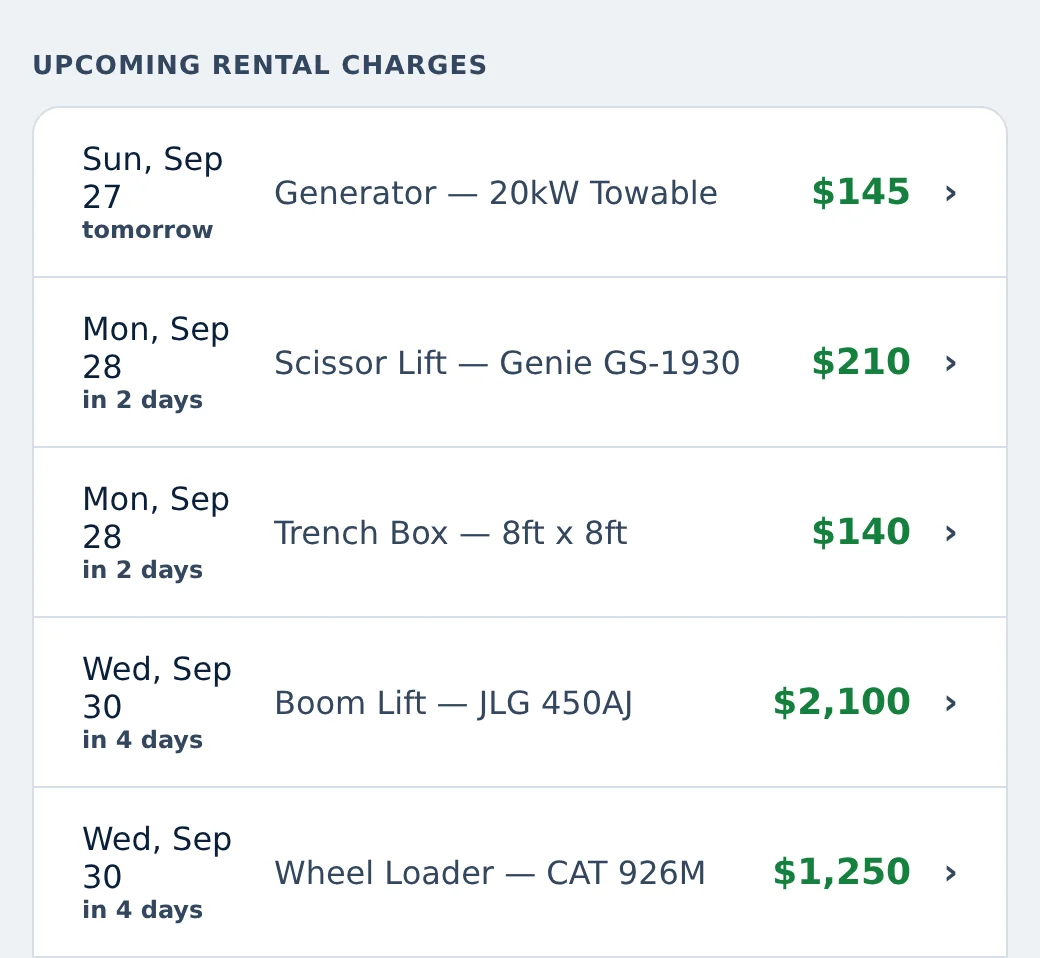
Upcoming charges in the Rental Leak app, shown with sample data.
Reminders
Reminders on iOS and Android
The Rental Leak iOS and Android apps send rollover reminders at 8 a.m. local time. By default you get one reminder the day before a rollover; in settings you can also turn on a reminder three days before and one on the morning of the rollover, or turn reminders off.
Reminders are sent only for rentals with confirmed terms — a rental that still needs review doesn’t get a reminder with a guessed date. The web app doesn’t send reminders; it shows the same upcoming charges on the dashboard.
Before the next cycle
How to stop a rental before the next 28-day billing cycle
The same four steps work for any billing period. On a 28-day cycle they matter most, because the rollover date moves earlier on the calendar every month.
Find the real rollover date
Count from the rental’s start date, not the first of the month. A 28-day rental that started March 2 rolls March 30, then April 27.
Ask the field a few days ahead
Is it still needed? The people on site know; the date is what they are usually missing.
Call it off with enough notice
Contact the rental company before the rollover, with whatever notice your agreement requires for a pickup.
Confirm it actually went back
A request is not a return. Follow up until the vendor has picked it up, and record the date.
Why the dates drift: 28-day vs monthly rental billing. What to say and record when you make the call: how to call off rental equipment. In Rental Leak the rollover date is calculated for you, the office can ask the site to verify the rental is still needed, and the request stays in off-rent tracking until the pickup is confirmed.
Then decide
An alert is only useful if it leads to a decision
When a reminder comes in, open the rental and decide: KEEP it (checked, still needed), or request off-rent and follow up with the vendor until it’s picked up and marked returned. See return and off-rent tracking for how each step is recorded.
Each step does something different to the billing clock:
- KEEP records that someone checked and the rental is still needed. It doesn’t move the billing date — the next rollover stays where it was.
- OFF-RENT REQUESTED records that your team decided to send it back. The rental is still on rent and still counted toward the next charge until it is picked up. Rental Leak doesn’t contact the vendor for you.
- RETURNED records the pickup date and closes the rental. Only then does it leave your upcoming charges.
If an invoice still bills past the return, see what to check when you are charged after a return. And a rental nobody recorded never sends a reminder — here is how to find forgotten rental equipment.
Common questions
Which billing cycles does Rental Leak track?
Daily, weekly, 28-day and monthly. The next rollover is calculated from the rental’s start date and the billing period you confirm.
Do reminders work on the web?
No. Rollover reminders are sent by the iOS and Android apps. On the web, upcoming charges are shown on the dashboard.
When are reminders sent?
At 8 a.m. local time. The default is one reminder the day before a rollover; you can add three days before and the morning of, or turn reminders off.
What happens if a rental rolls over before we decide?
The next billing period starts and, under most agreements, is charged in full. Rental Leak then shows the following rollover as the next charge, so the keep-or-return decision stays in front of you.
How does monthly billing handle short months?
Monthly rentals roll on the same day of the month as the start date. When a month is shorter, the rollover falls on its last day, and the original day comes back the month after — a rental that started on January 31 rolls February 28, then March 31.
How do I avoid paying for another rental billing cycle?
Know the exact rollover date, decide a few days before it whether the rental is still needed, and call the vendor with the notice your agreement requires. Then follow up until the pickup is confirmed, because a rental that is still on site when the cycle rolls over is usually billed for the new period.
Keep reading
Related
Construction rental cost tracking
Current rental cost, upcoming charges and rental cost reports by job and vendor.
Track rental costs →Off-rent and return tracking
KEEP, off-rent requested and returned, each recorded separately with who and when.
Track off-rent requests →28-day vs monthly rental billing
Why a 28-day rental rolls over earlier than a monthly one.
Read the guide →How to call off rental equipment
A call-off checklist that keeps each step on the record.
Read the guide →Rental tracking spreadsheet alternative
What a spreadsheet handles, where it stops, and how to import the one you have.
Compare with a spreadsheet →Rental invoice reconciliation
Compare each vendor invoice with the rate, cycle and return date on record.
Reconcile rental invoices →See what rolls over next
30 days free, no credit card required. New trials include Pro features for the full 30 days. After that, plans start at $59/month — priced by team size, with no per-rental or per-asset fees.