
Construction rental management software
Construction Rental Management Software for Contractors
Rental Leak is rental management software for contractors who rent equipment and temporary jobsite services. Field and office teams track every rental across vendors and jobsites — the rental agreement, the rate, the billing cycle and next charge, the KEEP or off-rent decision, the return and the vendor’s invoice — on web, iOS and Android.
30-day free trial • No credit card required • Web, iOS and Android
The problem
Contractors rent from everyone. Nobody sees the whole picture.
A typical contractor has rentals out with several vendors at once, spread across several jobs, on different billing cycles. The information lives in agreements in a truck, invoices in an inbox, a spreadsheet somebody updates when they remember, and the heads of the people in the field.
- The office can’t easily answer “what are we renting right now, and what is it costing us?”
- A rental finishes its work, but nobody is sure it can go back — so it keeps billing.
- Daily, weekly, 28-day and monthly cycles roll over on different days for every rental.
- Field crews and the office each assume the other one called the vendor.
- Invoices arrive weeks later, after the extra billing period has already been charged.
An illustrative week. A site-work contractor has three jobs running. Job A has an excavator on a 28-day cycle from a national chain and a trench box billed weekly by a local yard. Job B has a boom lift on a weekly cycle and a generator billed daily. Job C has temporary fencing and portable toilets billed monthly by two service providers. That’s five vendors, four billing cycles and seven different rollover dates — before anyone has asked what is still needed.
In Rental Leak the same week is one list. The trench box that rolls over tomorrow is at the top, the generator the crew finished with is flagged for off-rent and stays in follow-up until the vendor picks it up, and every agreement is attached to its rental.
What it does
One system for the rentals your jobs depend on
Rental Leak is built around a single question — what are we still paying rent on, and when does it roll over next? Everything in the product serves that question.
Every rental in one place
Equipment and temporary services from every vendor, organized by vendor and by project, with the equipment, unit number and PO you use to find it.
Rates and billing dates
The confirmed rate and billing cycle for each rental — daily, weekly, 28-day or monthly — the date and amount of the next charge, and a projection of the next 30 days if nothing changes.
Agreements attached
Snap the rental agreement or upload the PDF. Rental Leak reads it and suggests the details; you confirm them before anything is saved.
Keep or return decisions
Each rental is kept on purpose, flagged for off-rent, or returned — and every decision is recorded with who made it and when.
Field and office together
Office staff and field crews work from the same list on web, iOS and Android, with roles that match how your company runs.
Invoices checked Contractor & Pro
Rental invoice reconciliation compares a vendor’s invoice against your confirmed terms and flags a possible extra billing period before you pay.
The dashboard
What your team sees first thing
Money at risk today, rollovers this week, a 30-day projection, what needs attention, and each rental with a KEEP or OFF-RENT decision.
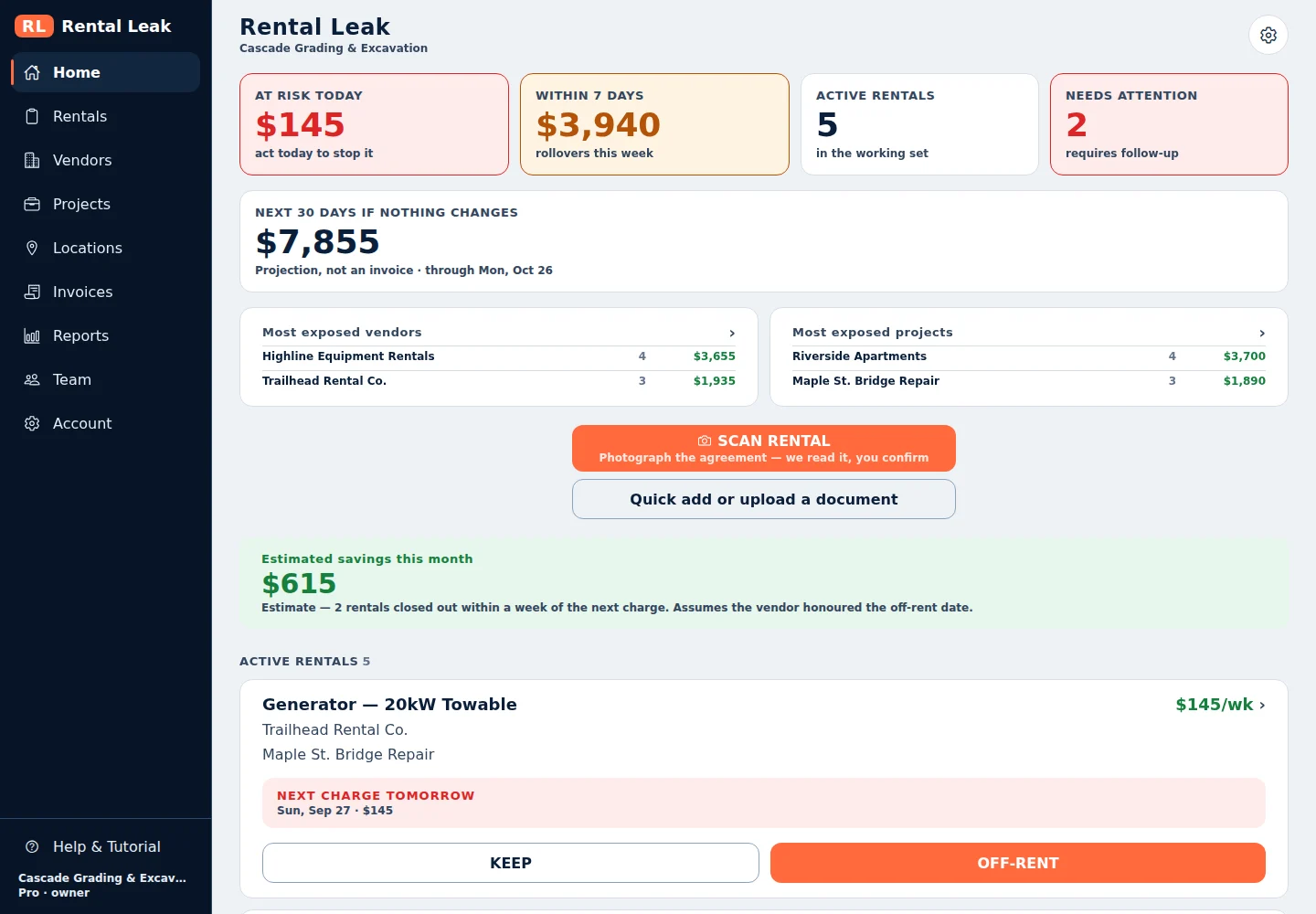
The Rental Leak web app, shown with sample company data.
What contractors manage
The rental workflow, from the agreement to the invoice
Each part of the workflow has its own page. Start with the one that matches the problem in front of you.
Rental agreements
Photograph or upload the agreement, confirm what it says, and keep it attached to the rental.
Rental agreement tracking →Rented equipment
Excavators, lifts, generators, trailers and attachments, each with its vendor, job, rate and next charge.
Equipment rental tracking software →Temporary services
Dumpsters, portable toilets, storage containers and temporary fencing that bill every cycle.
Temporary jobsite services tracking →Multiple jobsites
What is active on each project, with field verification when the office needs an answer from the site.
Track rentals across jobsites →Multiple rental vendors
Every rental company on one list, each with its own agreements and billing schedule.
Multi-vendor rental tracking →Billing cycles
Daily, weekly, 28-day and monthly rollover dates, calculated for every rental.
Track rental billing cycles →Rental costs
Current rental cost, upcoming charges and rental cost reports by job and vendor.
Construction rental cost tracking →Off-rent and returns
KEEP, off-rent requested and returned, recorded separately so a request is never mistaken for a pickup.
Off-rent tracking →Rental invoices
On the Contractor and Pro plans, each vendor invoice is compared with the rate, cycle and return date on record.
Rental invoice reconciliation →Who it is for
Built for the contractor side of the rental
Rental Leak is for the company that rents equipment and jobsite services: general contractors, subcontractors, excavation and site-work crews, concrete, electrical, mechanical and specialty contractors — anyone whose jobs run on rented equipment and recurring site services.
It is not software for rental companies. It doesn’t manage a rental fleet, take reservations, run a counter or process customer orders. If you own the equipment and rent it out, Rental Leak isn’t the right tool. If you pay the rental invoices, it is.
It is also deliberately narrow. Rental Leak isn’t a CRM, an estimating package, a scheduling tool or an accounting system. It does one job — keeping rental spend visible and under control — and connects to the rest of your workflow through exports and by sending reviewed rental invoices to QuickBooks Online as Bills, both on the Contractor and Pro plans. QuickBooks handles the accounting; Rental Leak handles the rental workflow before and around the accounting entry (see how to track rental costs in QuickBooks).
How it’s different
Not fleet software, not a project suite, not another spreadsheet
Contractors are often shown tools built for a different job. Here is where Rental Leak fits.
Fleet management and telematics
Built for equipment you own — location, engine hours, maintenance — usually with a GPS device on each machine. Rental Leak tracks what you pay to rent: vendor, rate, billing cycle and next charge. Nothing is installed on the equipment, and it works for any vendor’s machines.
General construction software
Project management, scheduling, estimating or dispatch cover a lot of ground. Rental Leak covers one question in depth: what is still on rent, when does it roll over, and who decides whether it goes back.
Spreadsheets
A sheet works for a handful of rentals and one person. Billing dates, reminders and decisions all have to be kept up by hand — here is when that stops working.
How it works
From the agreement to the return
Add the rental
Photograph or upload the agreement, use Quick Add, or import the spreadsheet you use today on the web app.
Confirm the terms
Review the suggested vendor, rate and billing cycle. Nothing becomes a financial fact until you confirm it.
Watch the next charge
The dashboard shows what’s at risk today and what rolls over in the next seven days.
Decide in time
Keep it, request off-rent, or mark it returned — before the next billing period starts.
Pricing
Priced by team size, not by how much you rent
Rental Leak uses published monthly plans based on the number of users. Many construction software platforms are sold on custom quotes, per-asset pricing or hardware; with Rental Leak, adding rentals, vendors, projects or equipment doesn’t change your bill — only adding people can move you to a larger plan.
Starter — $59/month
Up to 3 users. Scanning, rollover tracking and reminders, vendors, projects and the dashboard.
Contractor — $99/month
Up to 10 users. Adds team verification, rental PDF, CSV and Excel export, invoice reconciliation, QuickBooks Online integration and accounting export.
Pro — $149/month
Up to 25 users. Adds spend and rollover reports, vendor spend analytics and location reporting.
- No per-rental fees — the number of rentals you track doesn’t change the price.
- No per-asset, per-vendor or per-project fees.
- No GPS or telematics hardware to buy or install.
- Published prices, so you know what it costs before you sign up.
Common questions
Is Rental Leak for rental companies?
No. Rental Leak is for contractors who rent equipment and jobsite services from rental companies. It doesn’t manage a rental fleet, reservations or customer orders.
Does Rental Leak call or email my vendors automatically?
No. Rental Leak never contacts a vendor on its own. When you decide a rental should go back, you can send the vendor an Off-Rent Notice email after confirming the recipient, or call them yourself and record that you did. The rental keeps billing until the vendor confirms the return and you mark it returned.
Do I have to type in every rental by hand?
No. You can photograph or upload the rental agreement and confirm the details Rental Leak reads from it, use Quick Add, or — on the web app — import an existing Excel, CSV or TSV rental list.
What does it cost?
Starter is $59/month for up to 3 users, Contractor is $99/month for up to 10 users, and Pro is $149/month for up to 25 users. Every plan starts with a 30-day free trial and no credit card is required.
Does Rental Leak charge per rental or per asset?
No. Plans are priced by the number of users: $59/month for up to 3, $99/month for up to 10 and $149/month for up to 25. The number of rentals, vendors, projects or pieces of equipment you track doesn’t change the price.
Do I need GPS or telematics hardware?
No. Rental Leak tracks the rental itself — vendor, rate, billing cycle, next charge and the keep-or-return decision — so there’s nothing to install on equipment. It works the same for any vendor’s machines and for temporary services.
What can contractors track in Rental Leak?
Rented equipment such as excavators, lifts, generators and trailers, and temporary jobsite services such as dumpsters, portable toilets, storage containers and fencing. Each rental keeps its vendor, job, rate, billing cycle, agreement, status and history.
Does Rental Leak replace QuickBooks or our accounting software?
No. QuickBooks handles the accounting. Rental Leak handles the rental workflow before and around the accounting entry: what is on rent, when it bills next, whether it went back and whether the invoice matches. On the Contractor and Pro plans, a reviewed rental invoice can be sent to QuickBooks Online as a Bill.
Keep reading
Related
Equipment rental tracking
What to record for every rented machine, and how to keep that record current across vendors and jobs.
Track rented equipment →Rental cost control
See what your jobs are still paying to rent, and what the next billing cycles will cost.
Control rental costs →Multi-vendor rental tracking
Rentals from national chains, local yards and service providers on one list, without a portal for each.
See every vendor at once →See every rental your company is paying for
30 days free, no credit card required. New trials include Pro features for the full 30 days. After that, plans start at $59/month — priced by team size, with no per-rental or per-asset fees.