
Off-rent and rental return tracking
Track Off-Rent Requests and Rental Equipment Returns
Rental Leak tracks the life of every rental in separate steps: active, KEEP, off-rent requested and returned. The most expensive gap in rental tracking is the one between “we asked for a pickup” and “the vendor actually took it.” With each step recorded, everyone can see which rentals are still needed, which are waiting on the vendor, and which are really closed.
30-day free trial • No credit card required • Web, iOS and Android
The problem
“Off-rent” means different things to different people
- The super says “call it off,” the office thinks it’s handled, and nobody calls.
- The call is made, but the pickup doesn’t happen for days — and the rental keeps billing.
- A machine is marked done on a sheet while it’s still sitting on site.
- When the invoice arrives, nobody can say who asked for the pickup, or when.
The workflow
Four states, each one explicit
Every rental in Rental Leak is in one of these states. Status only moves forward, with one exception: a mistaken off-rent request can be cancelled, which puts the rental back to active.
Active
On rent and billing. The next charge date and amount are shown on the rental.
KEEP
Someone checked and the rental is still needed. It stays active and billing; the check is recorded with who and when.
Off-rent requested
Flagged to go back. This is an internal follow-up status: the rental keeps billing and stays in “Needs follow-up” until it’s closed.
Returned / closed
The vendor has picked it up. Mark it returned with the actual pickup date — today or an earlier day — and it stops counting as billing in Rental Leak. History is kept.
Between the request and the pickup
What happens while a rental is waiting on the vendor
Rental Leak never contacts a vendor on its own, and requesting off-rent doesn’t stop the vendor’s billing. Once a rental is flagged, the rental screen gives you the follow-up steps:
- Send Off-Rent Notice — if the vendor has an email address on file, Rental Leak can email an off-rent notice after you confirm the recipient. If the email fails, the rental says so.
- Mark Vendor Contacted — record that you called or emailed the vendor yourself, with an optional off-rent confirmation number and note.
- Mark Returned / Closed — once the vendor has picked it up. Rental Leak asks when it was picked up — today or an earlier date, never before the rental started or in the future — before closing it.
- Cancel Off-Rent Request — if the rental turns out to be needed after all. It goes back to active and keeps billing.
An illustrative timeline
Off-rent requested is not the same as returned
- Tuesday. The super says the excavator is done. The PM requests off-rent in Rental Leak — the rental is now in follow-up, and still billing.
- Tuesday. The office sends the Off-Rent Notice email, or calls the vendor and records Mark Vendor Contacted with the confirmation number.
- Thursday. The excavator’s weekly cycle rolls over while it is still on site. Rental Leak still counts it as billing and keeps it in follow-up.
- Friday. The vendor picks it up. The office marks it returned with Friday as the pickup date.
- Later. The invoice arrives. On the Contractor and Pro plans, rental invoice reconciliation flags any charges dated after the recorded return date for review.
Illustrative example. Whether the vendor bills the new period depends on your agreement and their off-rent policy — see what a late decision can cost.
Avoiding another billing cycle
How to track off-rent equipment so it doesn’t bill another cycle
Off-rent tracking comes down to six habits. Each one closes a gap where a rental can keep billing without anyone noticing.
- Decide before the rollover. Know each rental’s next billing date a few days ahead — see tracking rental billing cycles.
- Record the off-rent request the moment it is made, with who asked and when, so “someone called it off” is a fact, not a memory.
- Record the vendor contact. Who reached the rental company, how, and the off-rent confirmation number if they give one.
- Keep it on a follow-up list until it leaves the site. Off-rent requested is still on rent, and still billing.
- Record the actual pickup date when you mark the rental returned.
- Check the next invoice against that date. If it bills past the return, here is what to check when a rental company is still charging after a return.
Who sees it
Visible in the field and in the office
Field users can mark rentals KEEP or request off-rent from the iOS or Android app on site. The office sees the same statuses on the web, and every off-rent request that’s still open shows up in “Needs follow-up” on the Home screen with its next rollover date, so nothing waiting on a vendor is forgotten.
Every step — the KEEP check, the request, the vendor contact, the return — is recorded in the rental’s history with who did it and when. On the Contractor and Pro plans, the office can also ask the field to verify on site whether a rental is still needed.
For a step-by-step checklist you can use with any vendor, read how to call off rental equipment.
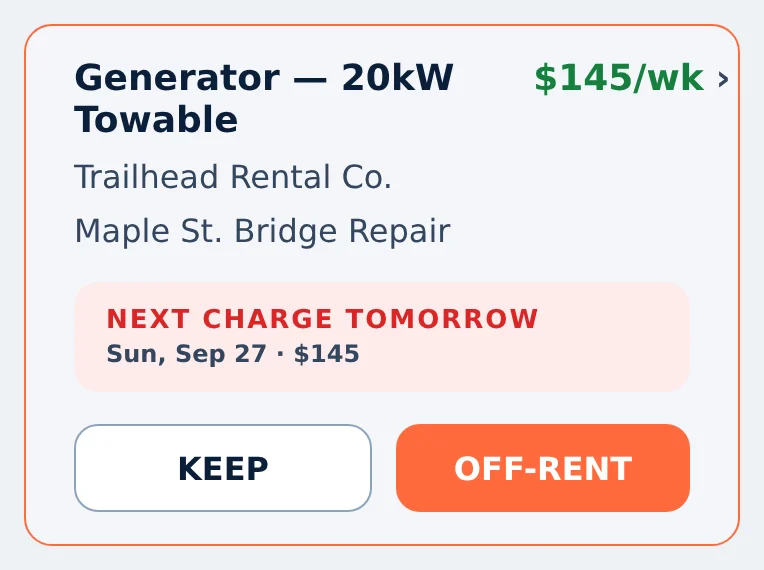
KEEP and OFF-RENT on a rental in the phone app, shown with sample data.
Common questions
Does requesting off-rent stop the rental charges?
No. Off-rent requested is an internal follow-up status in Rental Leak. The rental keeps billing until the vendor picks it up and you mark it returned.
Does Rental Leak contact the vendor for me?
Only when you choose to send an Off-Rent Notice email and confirm the recipient, and only if the vendor has an email address on file. Otherwise you contact the vendor and record it with Mark Vendor Contacted.
What if we requested off-rent by mistake?
Cancel the off-rent request. The rental goes back to active, keeps billing, and the history keeps both the request and the cancellation.
Can we record the actual pickup date?
Yes. When you mark a rental returned, choose today or enter the earlier day the vendor actually picked it up. It can’t be before the rental started or in the future.
How do we catch billing after a return?
On the Contractor and Pro plans, invoice reconciliation compares a vendor invoice with the rental’s confirmed terms and flags charges dated after the recorded return date for you to review.
What does off-rent mean?
Off-rent means the contractor has told the rental company a rental is no longer needed and should be picked up or ended. The rental usually isn’t closed until the vendor confirms it, and how and when billing stops depends on the rental agreement.
How do I track off-rent equipment?
Record the off-rent request when it is made, record the vendor contact and any confirmation number, keep the rental on a follow-up list until it is picked up, then record the actual return date. Rental Leak keeps each of those steps on the rental with who did it and when.
Keep reading
Related
Rental billing cycle tracking
Daily, weekly, 28-day and monthly rollover dates, with reminders before each one.
Track billing cycles →Rental tracking across jobsites
One rental list for the field and the office, organized by project.
Track every jobsite →Equipment rental tracking software
The rental record behind every machine: vendor, job, rate, cycle and agreement.
Track rented equipment →How to call off rental equipment
A call-off checklist that keeps each step on the record.
Read the guide →Charged after a rental was returned?
What to check on the agreement and the invoice, and what to send the vendor.
Read the guide →Rental invoice reconciliation
Compare each vendor invoice with the rate, cycle and return date on record.
Reconcile rental invoices →Know which rentals are actually returned
30 days free, no credit card required. New trials include Pro features for the full 30 days. After that, plans start at $59/month — priced by team size, with no per-rental or per-asset fees.