
Construction project closeout software
Construction Project Closeout Software for Contractors
Project closeout in Rental Leak helps a contractor finish a job without anything left hanging — and without paying for it after the crew has gone. Before the project closes, it shows the rentals and temporary services still billing, the equipment still assigned, the punch items still open and the vendor invoices still to review, with the rental charges scheduled in the next 30 days if nothing changes. Close the project, keep the record, and download a closeout summary. It is included on every plan.
30-day free trial • No credit card required • Web, iOS and Android
Before the job closes
Four things that keep costing money after a job ends
Rentals still on rent
Equipment and site services nobody called off, and off-rent requests still waiting for the vendor to pick up. They bill until they are returned.
Equipment still assigned
Machines your company owns that are still recorded on the project, instead of back in the yard or on the next job.
Punch items still open
Items to fix that are open or waiting for review on the Punch List.
Invoices to review
Vendor invoices with a possible billing difference — including billing after the recorded return — that nobody has marked reviewed.
How it works in Rental Leak
Start closeout, clear what is open, close the project
An Office / Manager or Owner / Admin chooses Start closeout on the project. Nothing else changes: rentals keep billing, equipment stays where it is and nothing is completed for you. The closeout screen then lists what still needs attention, with a check beside each part that is clear — rentals and temporary services addressed, owned equipment cleared, Punch List complete, no unresolved rental invoice warnings.
At the top is the remaining rental exposure: the charges scheduled in the next 30 days if the project’s current rentals stay on rent, from the same billing engine as the rest of Rental Leak. Each rental still on the project is listed with its next rollover and upcoming charge, and the usual actions are right there — KEEP, request off-rent, mark returned, or, on the Contractor and Pro plans, transfer it to another job.
When nothing needs attention, close the project. If something is still open, choose Close anyway and write a short reason; who closed it, when, the open items, the exposure shown and the reason are all recorded. A closed project is not archived: it stays readable, and the office can reopen it. If someone adds a rental to a project in closeout, Rental Leak asks them to confirm first.
Closeout uses what is already on the project — its rentals, owned equipment, punch items, tasks, invoices and daily log — so there is nothing to fill in. It is one part of Rental Leak’s construction management software. Open tasks are shown so you can review them, but they do not hold up closing.
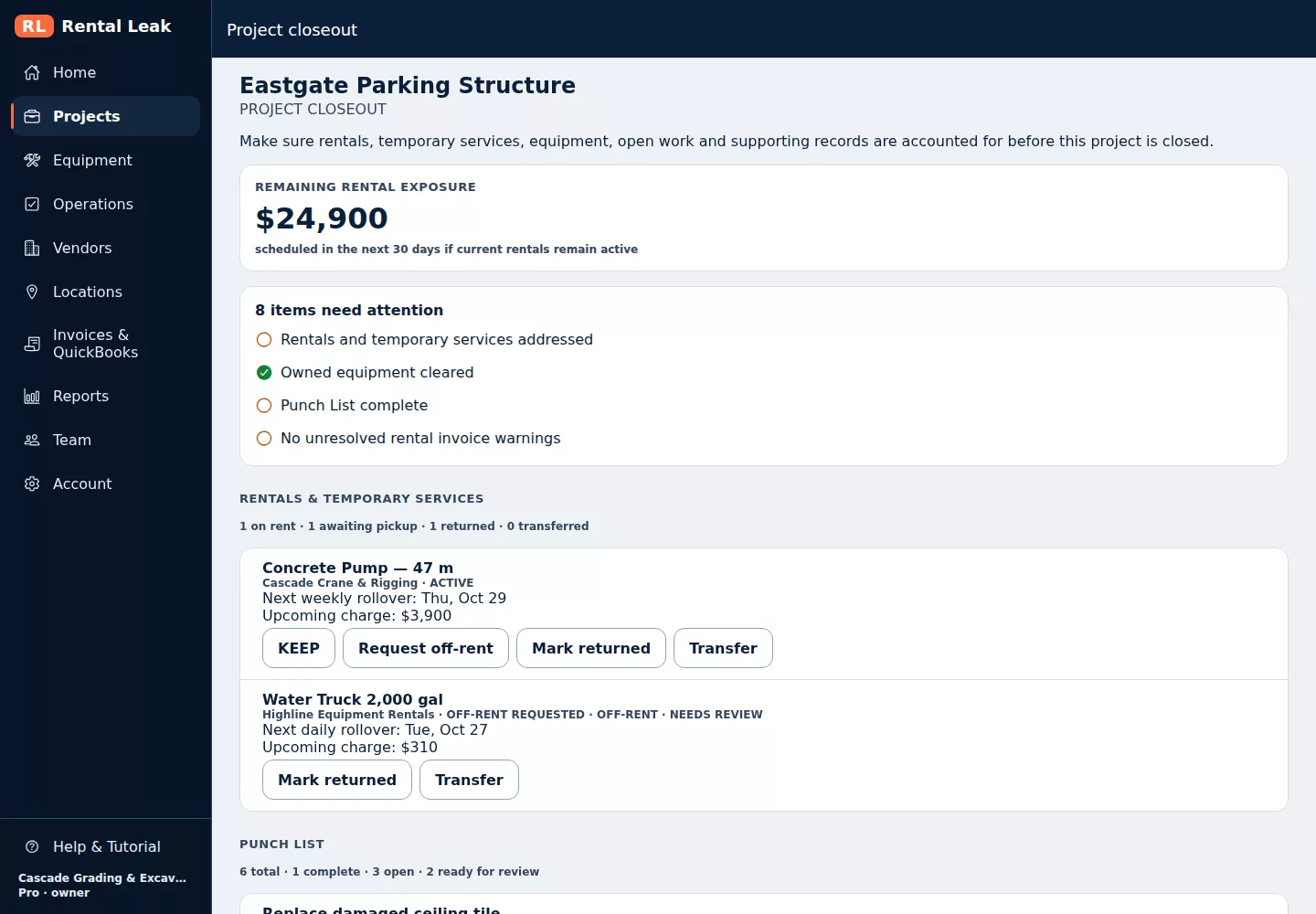
A project in closeout in the Rental Leak web app, shown with sample company data.
The record
A closeout summary you can keep
Once the project is closed, Download closeout summary creates a PDF of the closeout. It lists:
- Rental cost — estimated rental cost to date and the remaining exposure at close, from confirmed rates and billing periods.
- Rentals and temporary services — on rent, awaiting pickup, returned and transferred to another project.
- Owned equipment — anything still assigned to the project.
- Punch List — complete, open and ready for review.
- Open tasks and invoices — open tasks, vendor invoices and any possible billing difference still to review.
- Documents kept — rental agreements, delivery and pickup tickets, invoices, photos and daily log entries on file for the project.
Your closeout process
Where Rental Leak fits in your closeout
Rental Leak covers the cost side of closing a job. Before the project closes, it helps you confirm that:
- Rentals and temporary services are called off — each one marked returned, not only requested off-rent.
- Equipment is accounted for — rented equipment returned, and none of your owned equipment still assigned to the project.
- Punch items are clear — none open or waiting for review.
- Vendor rental invoices are reviewed — no possible billing difference left unreviewed.
Traditional handover documents — as-builts, O&M manuals, warranties, lien waivers, final pay applications and retainage — stay in your existing closeout and document process. Rental Leak does not manage them.
What it is and is not
Closeout for the costs, not a document package
It never changes a record
Closing never returns a rental, moves an asset, completes a task or closes a punch item. Each of those stays its own step.
Not a turnover package
Rental Leak does not assemble O&M manuals, warranties or owner sign-offs. It makes sure nothing on the project is still costing you money.
On every plan
Project closeout is included on Starter, Contractor and Pro. On Contractor and Pro, a projected closeout date can also estimate rental cost through the planned finish.
Common questions
Is project closeout included on every Rental Leak plan?
Yes. Project closeout and the closeout summary PDF are included on Starter, Contractor and Pro.
Does starting closeout return the rentals on the project?
No. Starting closeout and closing the project never change a rental, an owned asset, a task or a punch item. Rentals keep billing until each one is marked returned.
What does Rental Leak check before a project closes?
Rentals and temporary services still on rent or waiting for pickup, owned equipment still assigned to the project, punch items that are open or ready for review, and vendor invoices with a possible billing difference that have not been marked reviewed. Open tasks are listed too, but they do not hold up closing.
Can a project be closed with items still open?
Yes. An Office / Manager or Owner / Admin can choose Close anyway and give a short reason. The reason, the open items and the remaining rental exposure at that moment are recorded.
Who can start or close project closeout?
An Office / Manager or Owner / Admin starts closeout, closes the project and reopens it. Everyone on the team can see the closeout screen.
What is in the closeout summary PDF?
Estimated rental cost to date and the remaining exposure at close, the rentals and temporary services, owned equipment, punch items, open tasks, vendor invoices and the documents kept for the project, such as agreements, tickets, invoices, photos and daily log entries. It is available once the project is closed.
Is a closed project the same as an archived one?
No. A closed project stays readable with its full history, and an Office / Manager or Owner / Admin can reopen it.
Keep reading
Related
Construction punch list
Items to fix on site, with photos, from open to ready for review to complete.
See the Punch List →Off-rent and return tracking
From the off-rent request to the pickup, with every step recorded.
Track returns →How to find forgotten rental equipment
A walk-through for finding rentals nobody is using.
Read the guide →Close every job with nothing left billing by accident
30 days free, no credit card required. New trials include Pro features for the full 30 days. Plans start at $59/month after that.