
Construction punch list software
Construction Punch List Software for Contractors
The Punch List in Rental Leak is where a contractor keeps the physical items to fix before a job is done — a damaged ceiling tile, a curb to repair, paint to touch up, debris to clear. Each item has a location, a person, a due date and before and after photos, and moves from open to ready for review to complete. It sits on the same project as the job’s rentals, tasks and daily log, and it is included on every plan.
30-day free trial • No credit card required • Web, iOS and Android
What a punch item holds
Only a title is required
Add the rest when you have it. Everything else about the item — notes, photos and every change — collects on the item itself.
- Title
- Location on site
- Assigned to
- Due date
- Priority: Normal or High
- Description
- Up to 6 before photos
- Up to 6 after photos
- Notes and activity
Why punch lists drag on
The last items are the hardest to finish
A punch list is usually built near substantial completion, when the superintendent — often with the owner or architect — walks the job and writes down everything still unfinished, damaged or not done right. The final walkthrough checks those items again, and clearing them is often what releases final payment and retainage.
The list lives on paper
A punch walk written on a clipboard has to be typed up before anyone in the office can see it, and it is out of date the day after.
Nobody owns the item
“Fix the curb” without a name and a date beside it is still on the list a month later.
“Done” means different things
The crew says it is fixed; the superintendent hasn’t looked yet. Without a review step, items close before anyone checks them.
Photos sit in text threads
The before and after pictures that prove an item was fixed end up in someone’s camera roll instead of on the item.
It is separate from the job
A punch list in its own app or spreadsheet doesn’t sit next to the rentals still billing on the same site or the tasks still open.
Closeout waits on it
The job can’t be closed with confidence until someone can say which punch items are still open.
How it works in Rental Leak
Open, ready for review, complete
Open a project and choose New on the Punch List line. Give the item a title, and add a location, the person it is assigned to, a due date, a priority, a description and before photos if you have them. The project shows a one-line summary — how many items are open and how many are ready for review — with the way into the list.
The person it is assigned to fixes it, adds after photos and marks it ready for review. An Office / Manager or Owner / Admin then looks at it and marks it complete, or sends it back to open. A completed item can be reopened if the problem comes back. Every change and every note is kept in the item’s activity, with who did it and when.
The list filters by status — open, ready for review, complete or all — by who it is assigned to, and by what is overdue, so a superintendent walking the site can see exactly what is left. Photos are taken with the phone camera or uploaded as JPG or PNG, up to six before and six after.
The Punch List is separate from tasks on purpose. A punch item is something physical on site; a task is any other action item. Both live on the same project as its daily log, its rentals and its owned equipment — one part of Rental Leak’s construction management software.
Here is what punch list management looks like on one job. The sample project below, Eastgate Parking Structure, has six punch items from the walk: a damaged ceiling tile in Suite 104, paint to touch up at the storefront mullions, a cracked curb at the east drive, debris in two roof drains, a closer to adjust on a rear service door and a missing cover plate in an electrical room. Mike has the curb, marked high priority with a note to saw-cut and patch before striping. When it is patched, he adds after photos and marks it ready for review; the office compares the before and after photos and marks it complete or sends it back.
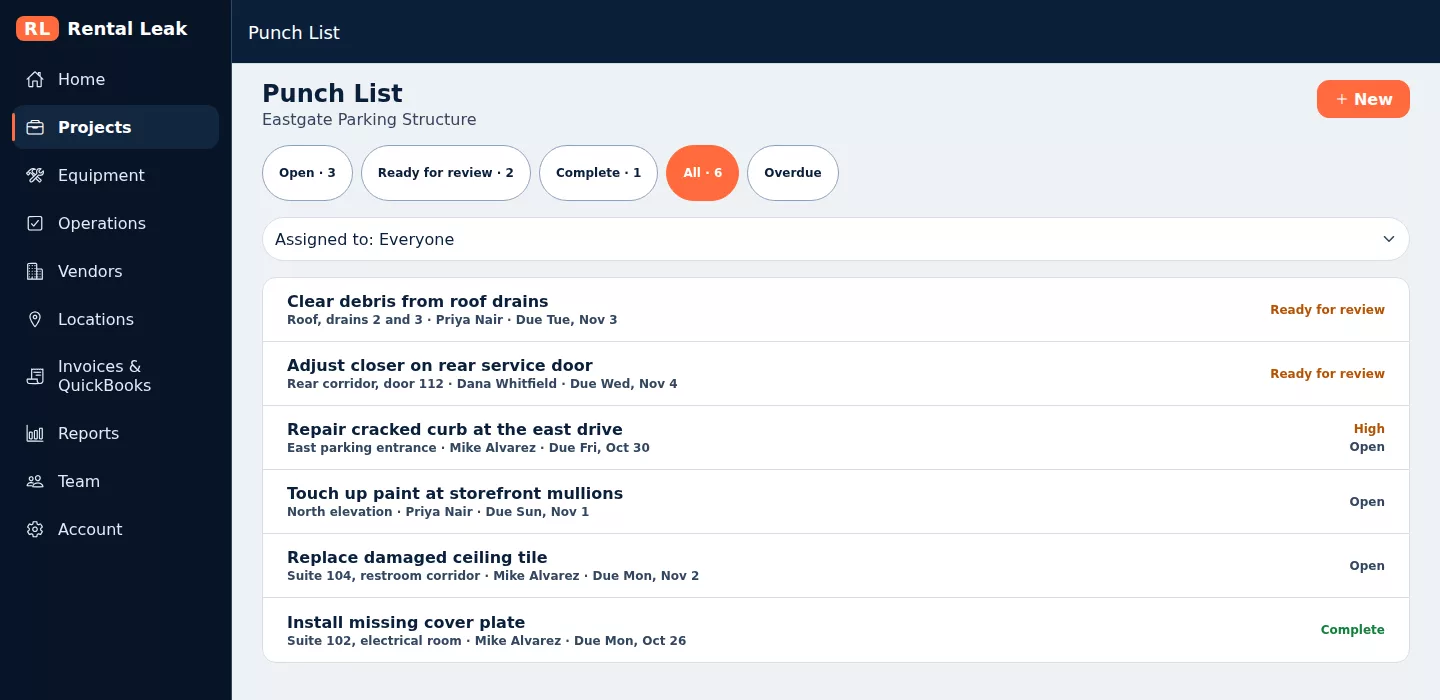
A project’s Punch List in the Rental Leak web app, shown with sample company data.
Field and office
The field fixes it, the office signs it off
Everyone can add
Anyone on the team can add a punch item, a note or a photo from the jobsite. A field user can edit the items they created while they are open.
The office decides
Assigning, changing the due date or priority, marking complete, reopening and deleting are for an Office / Manager or Owner / Admin.
Nothing is lost
A deleted item leaves the list and every count, but its history and photos are kept.
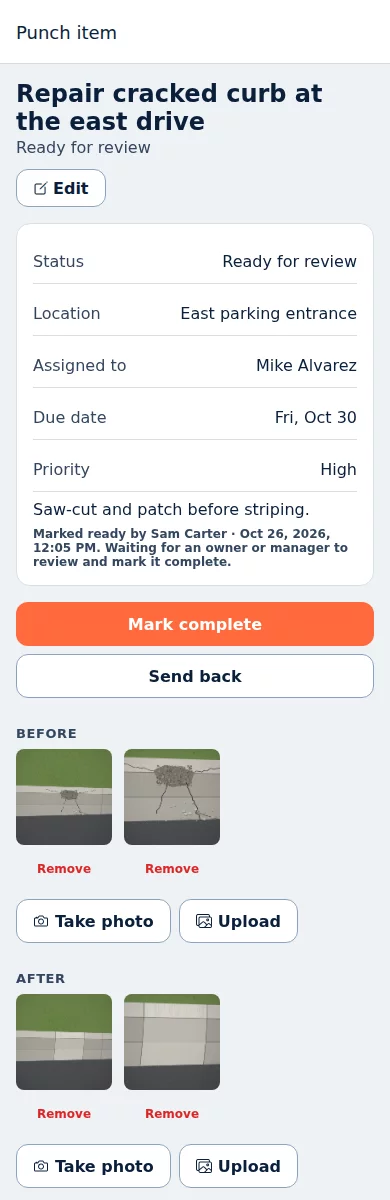
One punch item on a phone, shown with sample company data and illustrated demo photos.
At the end of the job
Part of project closeout
When a project goes into project closeout, its open and ready-for-review punch items are listed with the rentals still billing, the equipment still assigned and the invoices still to review. The project can’t show as ready to close while punch items are open, and closing it never changes a punch item.
What it is and is not
A punch list, not a document-control system
No drawing pins
Items carry a written location and photos. There are no drawings, pins or BIM models to maintain.
No sign-off chains
One review step by the office. No owner or subcontractor portals, signatures or approval workflows.
On every plan
The Punch List is included on Starter, Contractor and Pro, for every user on the team.
Common questions
Is the Punch List included on every Rental Leak plan?
Yes. The Punch List is included on Starter, Contractor and Pro, on the web, iPhone and Android.
What is the difference between a punch item and a task?
A punch item is something physical on site that has to be fixed or finished before the work is done, with a location and before and after photos. A task is any other action item, like a call to make or an inspection to reschedule. Both sit on the same project.
Who can mark a punch item complete?
An Office / Manager or Owner / Admin. The person doing the work marks it ready for review; the office checks it and marks it complete or sends it back.
Can field users add punch items and photos?
Yes. Everyone on the team can add punch items, notes and photos. A field user can edit the items they created while they are open, and can mark an item ready for review when it is assigned to them, created by them, or not assigned to anyone.
Can punch items be assigned directly to subcontractors?
Punch items are assigned to people on your Rental Leak team. There is no external subcontractor portal, so a subcontractor can’t receive or update items from outside your account. You can name the subcontractor in the item’s title or description and assign it to the person on your team who follows up with them. A subcontractor can also be added to your team as a Field User; they then count as a user on your plan and see your company’s projects like any other team member.
How many photos can a punch item have?
Up to six before photos and six after photos, taken with the phone camera or uploaded as JPG or PNG.
Does a deleted punch item disappear?
It leaves the Punch List and every count, but its history and photos are kept. Only an Office / Manager or Owner / Admin can delete one.
Does Rental Leak do drawings, pins or punch walk sign-offs?
No. There are no drawing pins, BIM models, owner or subcontractor portals, signatures or approval chains. The Punch List is a list of items with photos and a clear status.
Keep reading
Related
Project closeout
Close a job without rentals, equipment, punch items or invoices left hanging.
See project closeout →Construction task management
Action items by project, with one person, a due date and a history.
See tasks →Construction daily log
Work, crew, weather, deliveries, delays and photos by project and day.
See the Daily Log →Finish the last items on every job
30 days free, no credit card required. New trials include Pro features for the full 30 days. Plans start at $59/month after that.