
For contractors who rent equipment
Equipment Rental Software for Contractors Using QuickBooks
Most “equipment rental software” is built for the rental company: it books reservations and invoices customers. Rental Leak is built for the other side of that invoice — the contractor paying it. It tracks every machine and jobsite service you have on rent, warns you before the next billing cycle starts, checks the vendor’s invoice against what you agreed, and then sends the reviewed invoice to QuickBooks Online as a Bill.
30-day free trial • No credit card required • QuickBooks Online on the Contractor & Pro plans
Before the accounting entry
Rental management comes before the Bill
QuickBooks is where the rental invoice ends up. It records the transaction once the vendor bills you. The decisions that set that amount are made on the job, weeks earlier, and your accounting system never sees them.
What is rented, and where
Every excavator, lift, light tower, dumpster and portable toilet, with the job, vendor, unit number and PO it belongs to.
Whether it is still needed
A rental nobody has looked at keeps billing. Rental Leak puts the ones that need a decision in front of the person running the job.
When it bills next
The next rollover date for daily, weekly, 28-day and monthly rentals, and the expected charge if it rolls.
Whether the invoice is right
The rate, the billing period and the dates billed, compared with the rental record before the Bill goes to QuickBooks.
Want to see what one rental will cost before it rolls? Try the free rental rollover date checker. For the full picture of current rental cost by job, see construction rental cost tracking.
The workflow
How Rental Leak works with QuickBooks Online
Six steps in Rental Leak. QuickBooks only comes in at the last one, with an invoice that has already been checked.
Track the rental
Scan the agreement, upload it, or Quick Add: vendor, job, rate, billing period and start date.
Monitor the billing cycle
See each rental’s next rollover date. Reminders arrive on iOS and Android before it bills again.
Request off-rent
Mark it off-rent requested, then record how you told the vendor. It keeps billing until it is picked up.
Confirm the return
Record the day it actually left the jobsite, so the cost stops on the right day.
Review the invoice
Rental Leak compares the vendor’s invoice with the rental and flags a possible billing difference.
Send it to QuickBooks
The reviewed invoice goes to QuickBooks Online as one Bill, with the invoice file attached.
Step five is covered in detail on rental invoice reconciliation, and steps one to four on equipment rental tracking for contractors.
In the app
Invoices & QuickBooks in Rental Leak
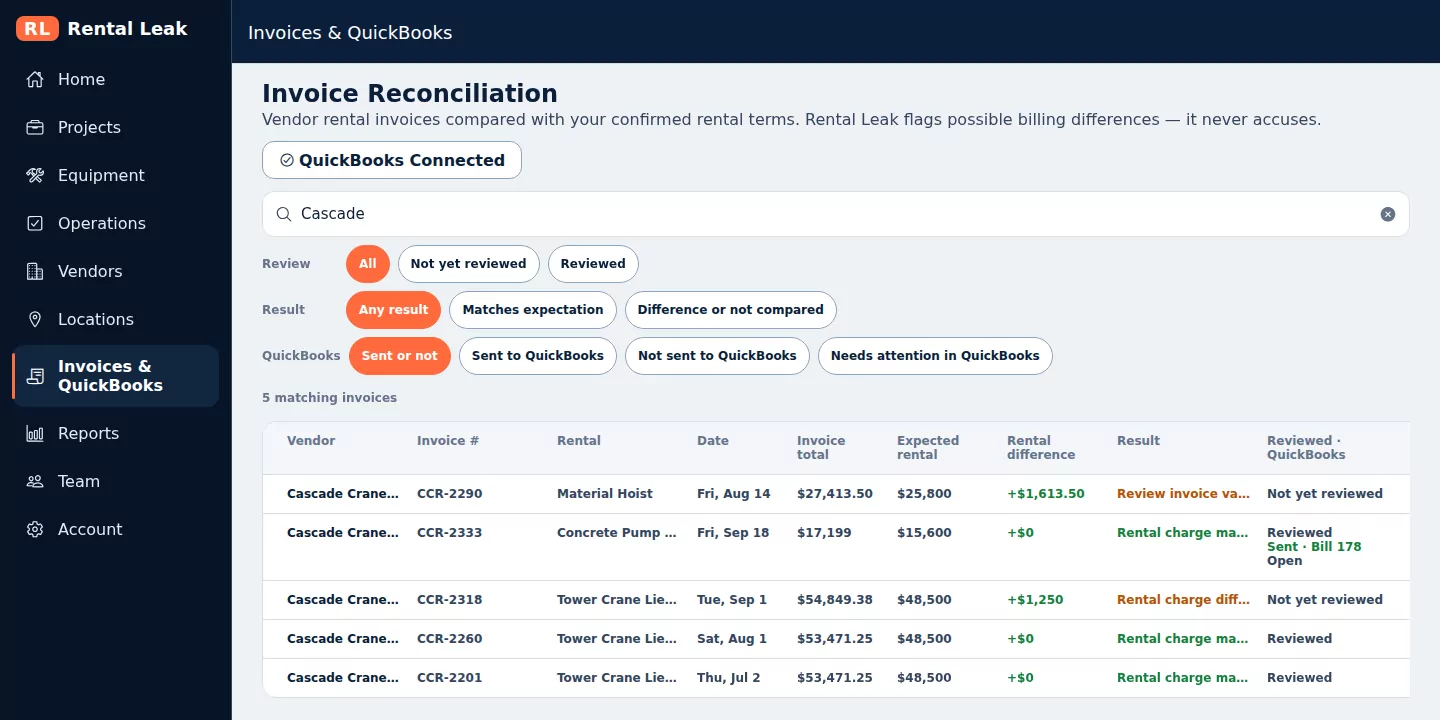
Each vendor invoice shows its reconciliation result and, once sent, its QuickBooks Bill and status. Rental Leak web app, sample company data.
Who the software serves
Contractor software vs rental-company software
Search for equipment rental software and most results are for the business renting equipment out. The two are built for opposite sides of the same invoice.
Rental-company software
Who uses it: The rental company
Main job: Reservations, rental contracts, deliveries
Invoices: Creates invoices for customers
Equipment: Fleet availability for customers to book
In QuickBooks: Customer invoices and payments received
Rental Leak
Who uses it: The contractor renting from it
Main job: Rentals across jobs, billing cycles, off-rent and returns
Invoices: Checks the invoices vendors send you
Equipment: What you have on rent, plus what you own and where it is
In QuickBooks: Vendor Bills for what you rented
Rental Leak is not software for companies that rent equipment out. It has no reservations, rental contracts or customer invoicing, and it never creates invoices in QuickBooks.
QuickBooks → Rental Leak
What QuickBooks data Rental Leak reads
Rental Leak reads from QuickBooks only when someone is looking at it, and it doesn’t keep a copy.
- Your lists, live, for matching. On the Integrations screen, Rental Leak reads your QuickBooks vendors, customers, projects and expense accounts so you can match each Rental Leak vendor and project to the right one.
- Add from QuickBooks, already matched. A vendor or customer that is in QuickBooks but not yet in Rental Leak can be picked and added to Rental Leak with the match in place. You choose each one; nothing is brought over in bulk.
- Status of its own Bills, on demand. When you open Invoices & QuickBooks or an invoice, Rental Leak reads whether each Bill it created is still open, paid, changed or deleted. It never reads other Bills.
- No background polling. Nothing runs on a schedule. It is not a sync, and there is no two-way connection to keep in step.
Rental Leak → QuickBooks
What Rental Leak sends to QuickBooks
One thing: a vendor rental invoice you have reviewed, as one Bill.
- One Bill per invoice. The matched vendor, the vendor’s invoice number and date, and the invoice total on the rental expense account you chose. The QuickBooks Bill ID shows in Rental Leak once it is sent.
- On the right job. The Bill goes to the matched QuickBooks customer or project when your QuickBooks company tracks expenses by customer.
- The invoice file is attached when the vendor invoice is stored in Rental Leak.
- Duplicates are checked first. Sending the same invoice twice never creates a second Bill, and a similar Bill already in QuickBooks is shown to you before anything is sent.
What Rental Leak never does in QuickBooks: create vendors, customers or accounts, or edit, pay or delete a Bill after it is sent. Your bookkeeper stays in charge of the books.
Setting up the accounts, vendors and job costing on the QuickBooks side is covered in the guide how to track equipment rental costs in QuickBooks. Connection steps are in Help. Rental Leak is not affiliated with or endorsed by Intuit.
Who it’s for
Built for the people who rent the equipment
General and specialty contractors
Excavation, concrete, electrical, mechanical, roofing and other trades renting equipment and jobsite services for several jobs at once.
Project and operations managers
Who need to know what is on rent on each job, what it is costing, and what should go back before the next cycle.
Equipment managers
Who coordinate pickups with several rental companies and keep rented and owned equipment straight.
The office and the bookkeeper
Who check vendor invoices and enter them in QuickBooks, and would rather enter a Bill that has already been reviewed.
Renting from more than one company? See multi-vendor rental tracking.
Common questions
Is Rental Leak equipment rental software for QuickBooks?
Yes, for the contractor who rents the equipment. Rental Leak tracks each rental from the agreement to the vendor invoice, and on the Contractor and Pro plans it sends a reviewed rental invoice to QuickBooks Online as a Bill. It is not software for companies that rent equipment out: there are no reservations, rental contracts or customer invoices, and it never creates invoices in QuickBooks.
Does data flow both ways between Rental Leak and QuickBooks?
Not as a sync. Rental Leak sends one thing to QuickBooks Online: a reviewed vendor rental invoice, as one Bill. It reads two things back, only when someone is looking: your vendor, customer and project lists while you match them on the Integrations screen, and the status of the Bills Rental Leak created. Nothing runs in the background and it doesn’t keep a copy of your QuickBooks lists.
Can Rental Leak create QuickBooks vendors?
No. Rental Leak never creates vendors, customers or accounts in QuickBooks. It goes the other way: a vendor or customer that already exists in QuickBooks can be added to Rental Leak, already matched.
What does Rental Leak send to QuickBooks?
One Bill per reviewed vendor rental invoice: the matched vendor, the invoice number and date, the invoice total on your rental expense account, the matched customer or project when your QuickBooks company tracks expenses that way, and the invoice file attached when it is stored in Rental Leak. After that, Rental Leak never edits, pays or deletes the Bill.
Does Rental Leak read Bill payment status?
Yes, for the Bills Rental Leak created, when you open Invoices & QuickBooks or the invoice itself. It shows whether the Bill is still open, paid, changed or deleted in QuickBooks. It never reads other Bills and there is no background polling.
Is this software for equipment rental companies?
No. Rental Leak is for contractors who rent equipment and temporary jobsite services from rental companies and pay the invoices. If you rent equipment out to customers, you need rental-company software with reservations, contracts and customer invoicing.
Can I track multiple rental vendors?
Yes. Rentals from every rental company sit on one list, each matched to its own vendor, and each vendor can be matched to the same vendor in QuickBooks.
Which plans include QuickBooks Online?
Rental tracking is on every plan. Sending reviewed invoices to QuickBooks Online is on the Contractor plan, at $99/month for up to 10 users, and the Pro plan, at $149/month for unlimited users. New 30-day trials include Pro features.
Keep reading
Related
Rental costs in QuickBooks
Expense accounts, vendor bills and job costing for rented equipment, step by step.
Read the guide →Rental invoice reconciliation
Compare each vendor invoice with the rate, cycle and return date on record.
Reconcile rental invoices →Equipment rental tracking
What is on rent, on which job, and when it bills next.
Track rented equipment →Check the rental before it becomes a Bill
30 days free, no credit card required. New trials include Pro features, QuickBooks Online included, for the full 30 days. Plans start at $59/month after that.