
Pro Operations · time
Construction Time Tracking and Weekly Timesheets for Contractors
Crews clock in and out on the project they are working on, from a phone. Breaks, forgotten punches and corrections are handled in the open, the original time is always kept, and the office approves each person’s week and exports it for payroll. Construction time tracking in Rental Leak is project-based time only — never pay — and it is on the Pro plan.
30-day free trial of Pro • No credit card required • Web, iOS and Android
What gets recorded
The hours, on the project, with nothing invented
Every entry is one person, one project, a clock-in and a clock-out. Worked time is clock-out minus clock-in minus breaks.
- Clock in and clock out
- Breaks
- The project
- Server time, not the phone’s clock
- Missed time, sent for review
- Corrections, with the original kept
- Weekly approval
- A CSV or Excel Timesheet Export
In the field
Clock in on the job in one tap
Open Operations. If you are scheduled today, your project is already there; otherwise pick the project you are working on and choose Clock in. While you are on the clock you can Start break and End break, then Clock out. The clock card shows how long you have worked today, and Home shows a Today line with the project and hours.
My time lists this week’s days and hours, with any correction you have sent and whether it is still waiting. Forgot to clock in? Add time I forgot to record sends it to the office for review before it counts. A project that is closed can’t be clocked in to; time on it can still be added as a correction.
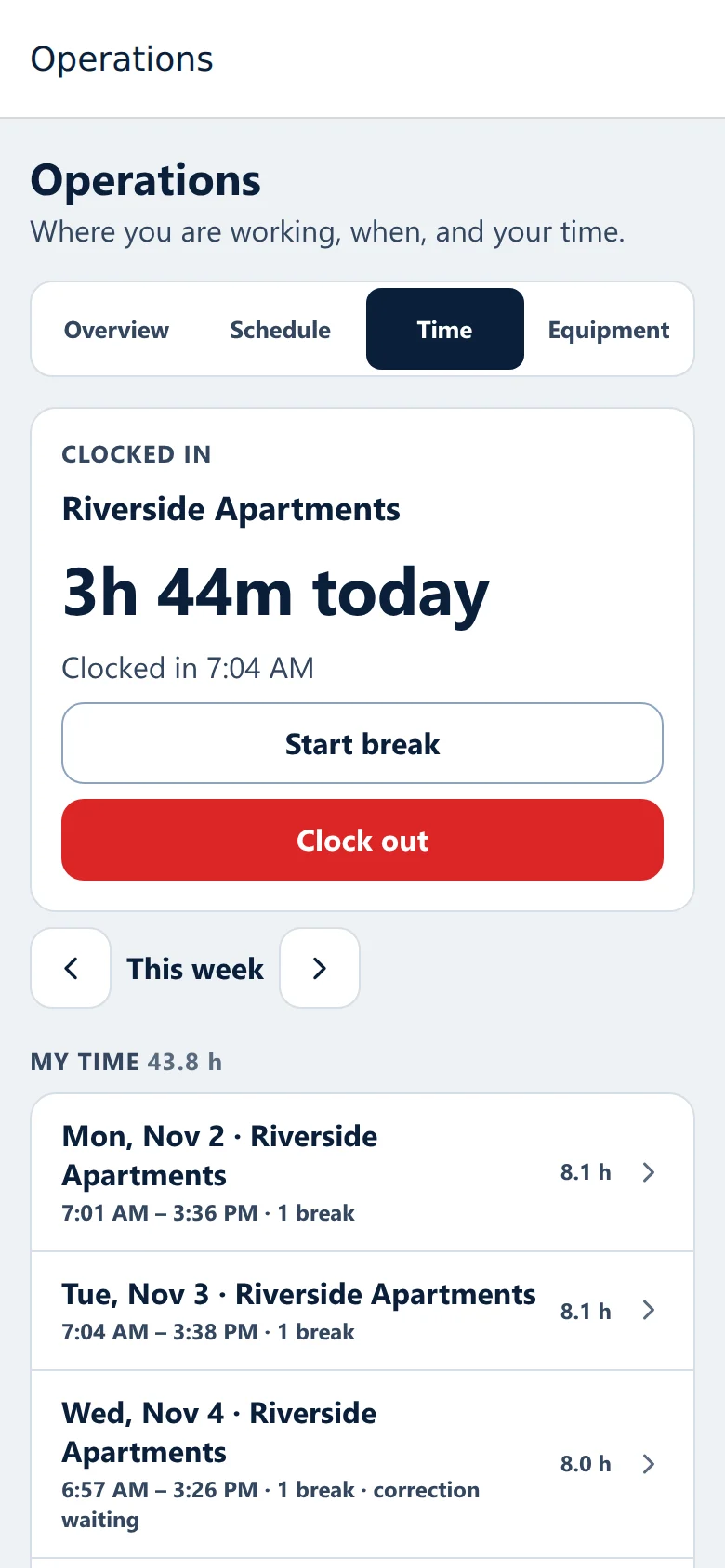
A field user’s clock and week, shown with sample company data.
Missed punches and corrections
Fix the time, keep the record
Missed punch
Still clocked in from an earlier day? Rental Leak never closes it with a time nobody entered. Fix this time sends the real clock-out as a correction.
Request a correction
Change the clock-in, clock-out, breaks or project and say what was wrong. It changes nothing until the office approves it, and it can be withdrawn until then.
The original is kept
An approved correction updates the entry, and the original stays in its correction history with who changed it and when — including a correction the office makes directly.
In the office
Review, approve and export the week
Under Time, owners and office managers see what needs review first — missed punches, corrections and missed time — then each person’s hours for the week.
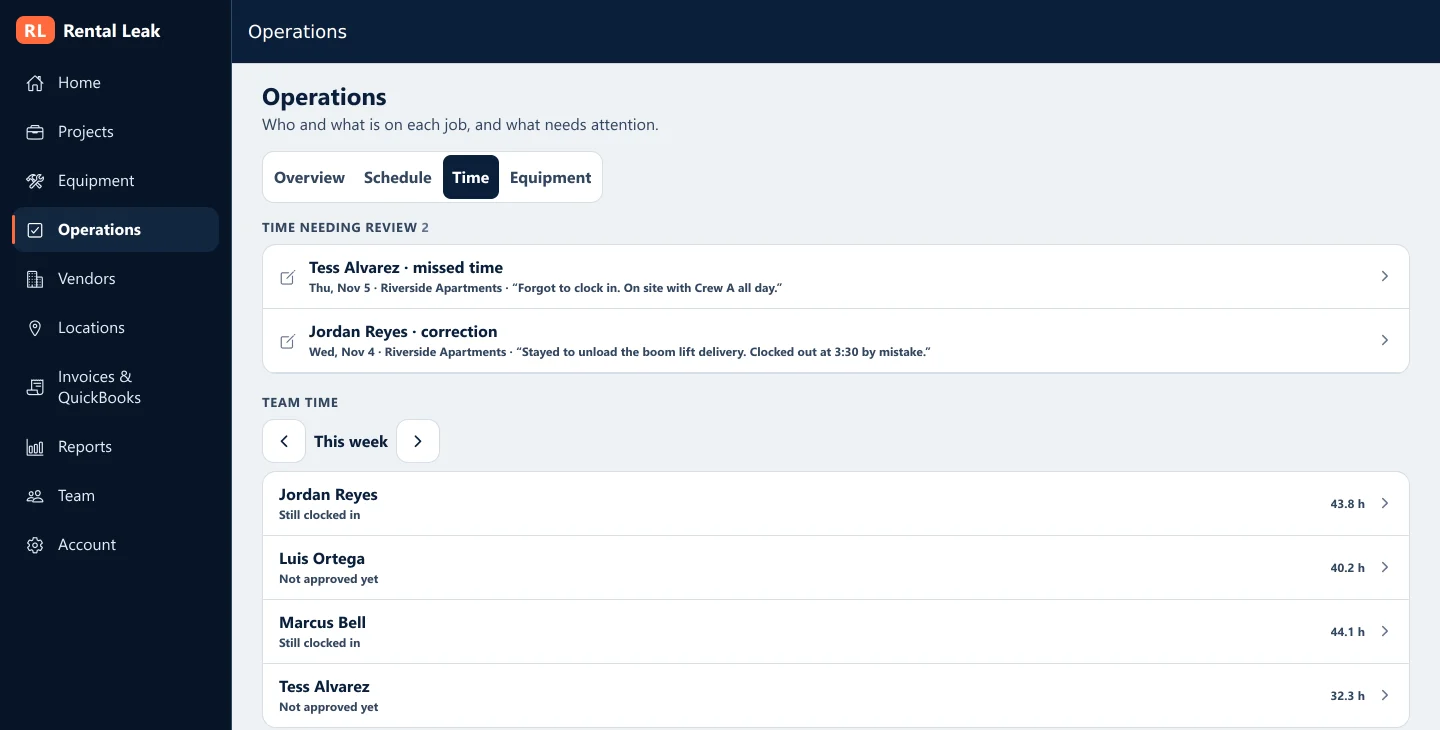
Operations → Time for an office manager, shown with sample company data.
Weekly timesheets
Weeks run Monday to Sunday. Open a person to see each day’s entries and the weekly total, then Approve week. A change after approval reopens the week by itself.
Self-approval rules
A manager can’t approve their own correction or week; an owner may. Field users can’t approve. The database enforces it, not just the screen.
Timesheet Export
CSV or Excel for up to 93 days: employee, employee ID, email, project, date, clock in and out, break hours, total hours, approval and corrected. Approved weeks by default.
Part of the job, not a separate app
Time on the same projects as everything else
Hours are recorded against the projects that already hold your rentals, owned equipment, tasks, Daily Log and punch list. A project shows a Time row with the hours recorded this week and anything that needs review. The crew schedule puts the right project on each person’s clock, so the office isn’t matching timecards to jobs at the end of the week.
The Daily Log’s crew entry stays a headcount for the record of the day. Time tracking is where each person’s hours live.
What it is and is not
Time tracking, not payroll or surveillance
No pay math
No wages, pay rates, overtime pay, taxes, benefits or deductions. Hours go to the payroll system you already use.
No location tracking
No GPS and no location at clock-in. Rental Leak records the project and the times, nothing about where a person is.
No invented times
An open entry is never closed automatically. Every change is a correction someone made, with the original kept.
Notifications that matter
A person is told when a correction is approved, not approved or made by the office. Nothing is sent for clocking in or breaks, and nothing by text message.
Monday weeks
Timesheets run Monday to Sunday, and decimal hours are worked out from whole minutes.
On the Pro plan
Time tracking and scheduling are Pro. Starter and Contractor keep tasks, the Daily Log, punch lists and closeout.
Common questions
Which plan includes time tracking?
The Pro plan, together with crew and equipment scheduling on the same projects. The 30-day free trial includes Pro. Starter and Contractor keep tasks, the Daily Log, punch lists and closeout.
Does Rental Leak do payroll?
No. Rental Leak records time only. It does not calculate pay, wages, overtime pay, taxes, benefits or deductions. The Timesheet Export is made to be imported into the payroll system you already use.
Does Rental Leak track where workers are?
No. No location is recorded at clock-in or at any other time. The clock records the project, the times and breaks.
What if someone forgets to clock out?
An entry still open from an earlier day shows as a missed punch. Rental Leak never closes it with a time nobody entered: the person, or the office, sends a correction with the real time.
Is the original time kept when it is corrected?
Yes. A correction changes the entry only once it is approved, or at once when the office corrects it directly, and the original time stays in the entry’s correction history with who changed it and when.
Who can approve timesheets?
An Owner / Admin or Office / Manager. A Manager can’t approve their own correction or their own week; an Owner may. A Field User can’t approve corrections or timesheets.
What does the Timesheet Export include?
One row per entry: employee, employee ID, email, project, date, clock in, clock out, break hours, total hours, approval and whether it was corrected, as CSV or Excel for up to 93 days. Approved weeks only unless you choose All recorded.
Can field users clock in from a phone?
Yes, on iPhone, Android or the web. Clock in, Start break, End break and Clock out are on the Operations screen, and the times come from Rental Leak’s server, not the phone’s clock.
Keep reading
Related
Crew and equipment scheduling
People and rented or owned equipment by project, day and week, with warnings.
See scheduling →Construction daily log
Work, crew, weather, deliveries, delays and photos by project and day.
See the Daily Log →Construction task management
Action items by project, each with one person and a due date.
See tasks →Project closeout
Close a job without rentals, equipment or invoices left hanging.
See closeout →Rental cost control
Estimated cost to date, budgets and forecasts for every project.
Track rental costs →Pricing
Starter, Contractor and Pro, with what each plan includes.
Compare plans →Hours on the right job, without the timecard shuffle
Rental Leak is construction management software for contractors. 30 days free, no credit card required. New trials include Pro features for the full 30 days. Plans start at $59/month after that.