
Pro Operations · scheduling
Construction Workforce and Equipment Scheduling Software
Who and what needs to be on which project, and when? Rental Leak schedules your crews and your equipment — rented and owned — on the same projects that already hold your rentals, tasks and daily log. Double-bookings, off-rent requests, equipment in the shop and rental rollovers show up while you plan, not after the invoice arrives. Workforce and equipment scheduling is on the Pro plan.
30-day free trial of Pro • No credit card required • Web, iOS and Android
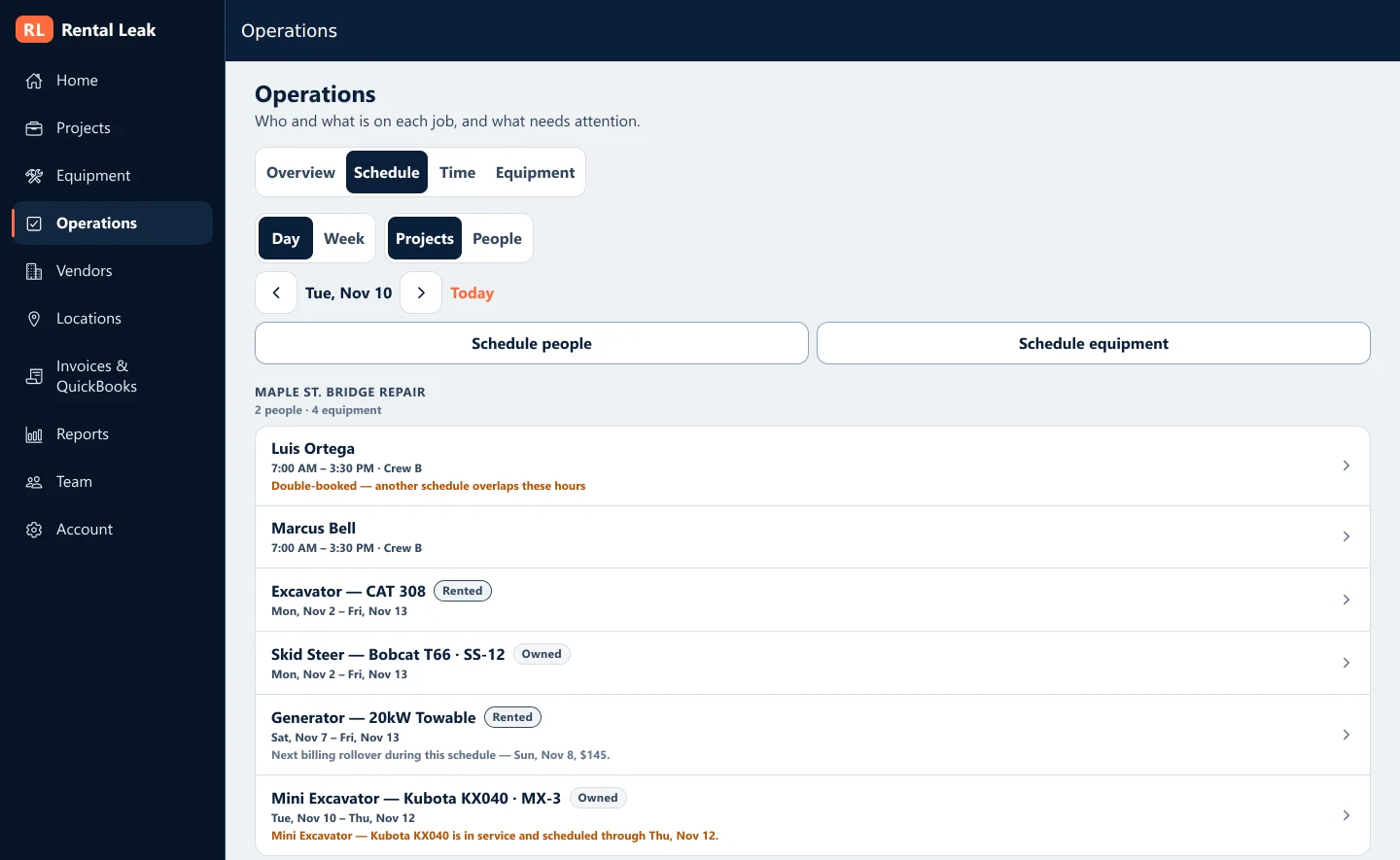
Schedule, one day by project, in the Rental Leak web app with sample company data.
Why schedules fall apart
The whiteboard doesn’t know what the rental company knows
Most crew and equipment schedules live on a whiteboard, a spreadsheet or a group text. They say who goes where, but not what is true about the equipment.
The same person, two jobs
A foreman is promised to two projects on the same morning, and nobody notices until one of them calls.
The machine already went back
A lift is planned for next week on a job, but the office called it off yesterday.
The rental is on the wrong job
A rented excavator is used on another project for a week, and its cost stays on the first one.
The owned machine is in the shop
Your own mini excavator is planned for Tuesday while it is still waiting for a hydraulic repair.
A billing cycle rolls in the middle
A weekly rental rolls over two days into the plan, and nobody weighed that against returning it.
The field finds out by text
Changes go out one message at a time, and the crew learns where they are going at 6 a.m.
Crew scheduling
Schedule people by project and day
Choose Schedule people, pick who is working, the project and the days, and set the hours. One save covers a whole week of the same shift.
- Who is working
- The project
- One or several days
- A start time
- An 8, 9 or 10 hour shift, or a typed end
- An optional crew name
- An optional note for the crew
- A day or week view, by project or by person
Each person gets one phone notification for the save and another if it changes or is cancelled; tapping it opens that day. When someone already has a schedule for overlapping hours, Rental Leak shows Double-booked and asks you to confirm — split shifts happen, so it is a warning, not a wall. A day that has passed, and a project that is closed or archived, can’t take a new schedule.
The schedule is also where the day’s time starts. A person who is scheduled sees their project ready on the clock, and construction time tracking records the hours against the same project.
Equipment scheduling
Rented and owned equipment on the same schedule
Rental Leak already keeps one Equipment list — what you rent and what you own (construction equipment management). Operations schedules both: pick a rental or an owned machine, the project, and the first and last day. The Equipment tab lists everything scheduled for the next four weeks, Rented and Owned, with conflicts first.
Can’t be scheduled
A rental marked Returned or voided, retired owned equipment, a machine already scheduled on overlapping days, or a day that has passed.
Warns, then saves
A rental with an off-rent request, a rental whose current project is a different one, and owned equipment in service, out of service or in use on another job today.
Information only
A rental’s next billing rollover inside the schedule, with its date and amount from the rental’s confirmed rate — the same figure as the rollover alerts.
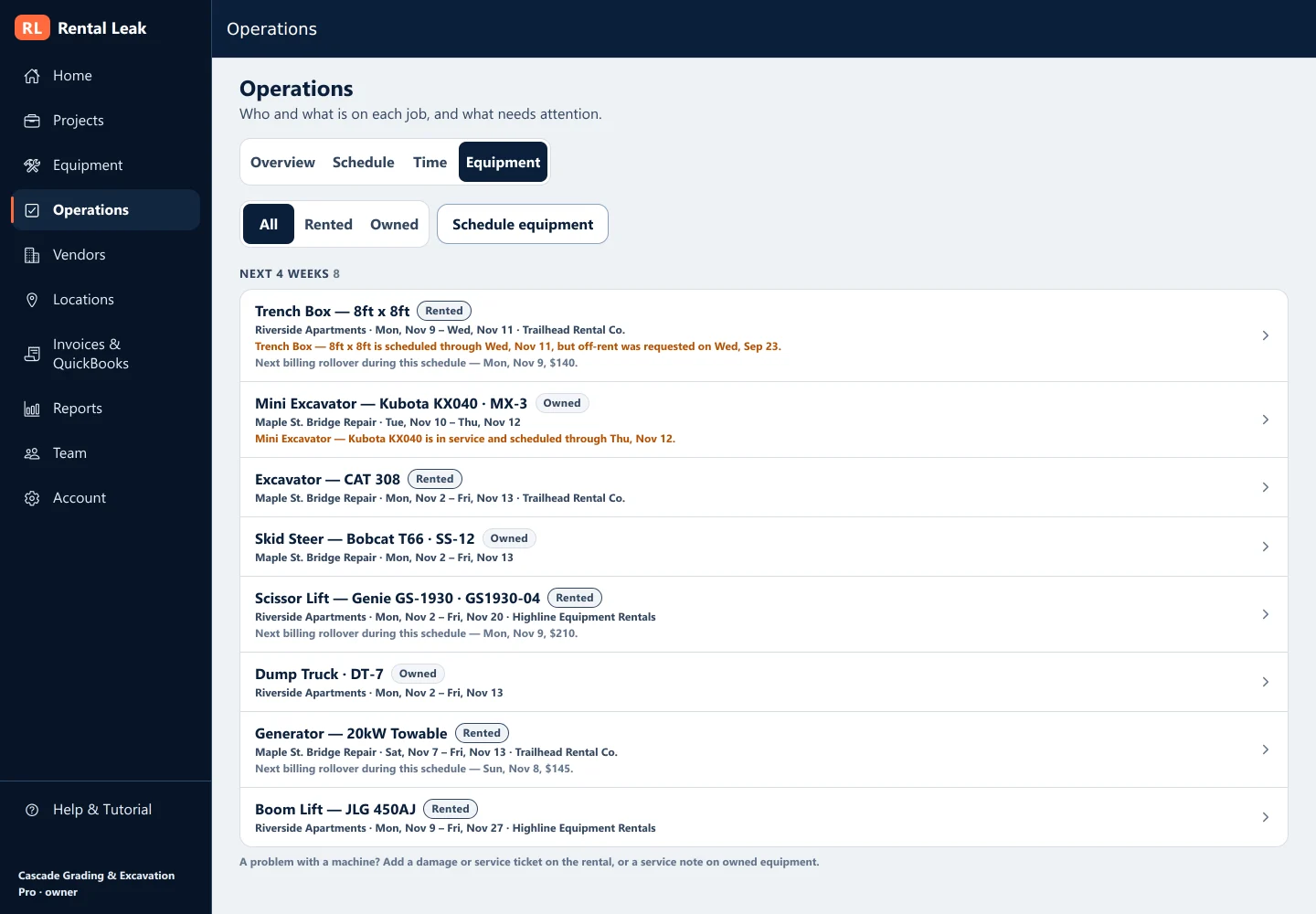
Operations → Equipment, the next four weeks, shown with sample company data.
A plan, never a move
Scheduling doesn’t change the record behind it
A schedule says where a person or a machine should be. It never changes the rental or the machine itself. Scheduling a rental on another project does not transfer it: Rental Leak warns that the rental belongs to a different project and offers Transfer, which moves the rental and splits its cost between the projects by the days each one had it (tracking across jobsites). Owned equipment is assigned from the equipment itself, and a repair stays a task or a service note on the machine.
That keeps the money honest. Project cost, the rental budget and forecast and the project closeout check still read the rental’s real project and billing, whatever the plan for next week says. Schedules are checked again every time they are shown, so a rental returned after it was scheduled says so.
Office and field
One schedule, seen two ways
The Operations Overview
For an owner or office manager: people scheduled and clocked in today, the projects active today, scheduled equipment and what needs a decision, and today by project.
The field user’s day
Their own clock and today’s project first, then who else is on that job, the equipment scheduled there and their next days. Read only: the office schedules.
On every project
A Schedule row on the project shows the people and equipment on it today, next to its rentals, Daily Log, tasks and punch list.
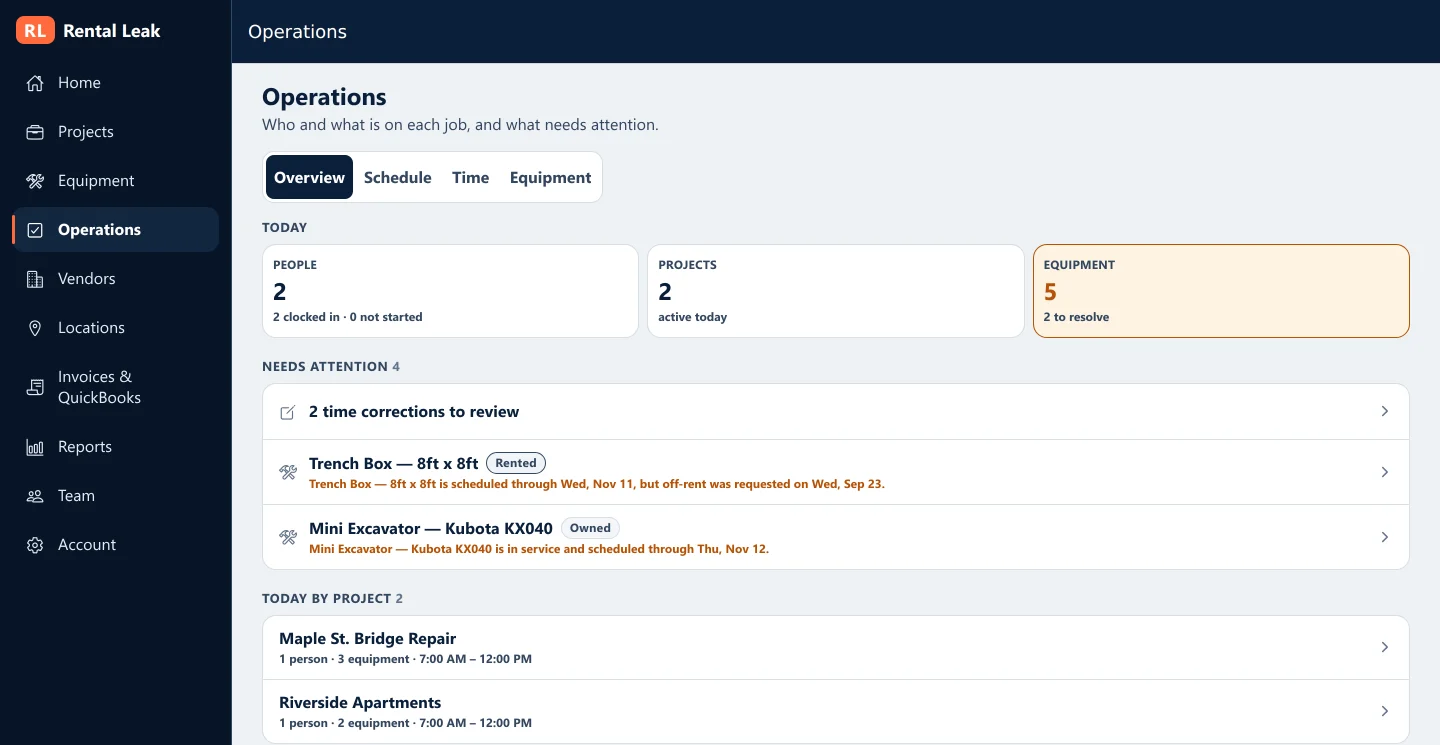
The Operations Overview, shown with sample company data.
What it is and is not
Scheduling for contractors, not a dispatch center
Not a Gantt chart
No dependencies, critical paths or baselines. It schedules people and equipment on projects by day.
No dispatch board
No drag-and-drop dispatch and no recurring templates beyond picking several days at once.
No location tracking
Rental Leak does not track where people or machines are. Nothing is recorded about location, ever.
Not payroll
Schedules and recorded hours are time only — no wages, pay rates or overtime pay.
Day shifts
A crew schedule starts and ends on the same day. Recorded time that runs past midnight still counts.
On the Pro plan
Starter and Contractor keep Operations as the Tasks page. Every plan keeps tasks, the Daily Log, punch lists and closeout. Planning in Excel for now? Use the free crew and equipment schedule template.
Common questions
Which plan includes workforce and equipment scheduling?
The Pro plan. Starter and Contractor keep Operations as the Tasks page, and tasks stay on every plan. The 30-day free trial includes Pro.
Can I schedule rented and owned equipment together?
Yes. A schedule points at an existing rental or a piece of owned equipment, and both appear on the same day and week views and on the Equipment tab, marked Rented or Owned.
Does scheduling a rental on another project transfer it?
No. A schedule is a plan and never moves anything. If a rental is scheduled on a project other than its current one, Rental Leak warns and offers Transfer, which stays a separate, recorded step. Owned equipment is assigned the same way, from the equipment itself.
What happens if someone is double-booked?
Rental Leak shows Double-booked when a person already has a schedule for overlapping hours and asks you to confirm. Split shifts happen, so it can still be saved.
Can a returned rental be scheduled?
No. A rental marked Returned or voided, retired owned equipment, and a machine already scheduled on overlapping days can’t be scheduled. A rental with an off-rent request can be scheduled after a warning, because it may be picked up first.
Can field users see the schedule?
Yes. A Field User sees their own schedule, who else is on their project on the days they are there, and the equipment scheduled on it. Only an Owner / Admin or Office / Manager can schedule people or equipment.
Are people notified about their schedule?
Yes, with a phone notification when they are scheduled, when the schedule changes and when it is cancelled. Tapping it opens that day. Nothing is sent by text message.
Is this a Gantt chart or dispatch software?
No. There are no task dependencies, critical paths or drag-and-drop dispatch board. It schedules people and equipment on projects by day, and the project’s own tasks stay separate.
Keep reading
Related
Construction time tracking
Clock in and out by project, corrections with the original kept, and weekly timesheets.
See time tracking →Construction equipment management
Rented and owned equipment on one list, with status, project and location.
See equipment →Construction task management
Action items by project, each with one person and a due date, on every plan.
See tasks →Off-rent and return tracking
From the off-rent request to the pickup, with every step recorded.
Track returns →Project closeout
Close a job without rentals, equipment or invoices left hanging.
See closeout →Pricing
Starter, Contractor and Pro, with what each plan includes.
Compare plans →Plan the week with the rentals in view
Rental Leak is construction management software for contractors. 30 days free, no credit card required. New trials include Pro features for the full 30 days. Plans start at $59/month after that.